 Chandni Nadarajan
July 17, 2026
Chandni Nadarajan
July 17, 2026
Imagine completing a jigsaw puzzle with one missing piece. You don’t give up immediately. You look at the surrounding pieces, compare colors, examine patterns, and identify the shape that fits best. How self-healing test automation works follows a similar process. When a locator fails, it doesn’t stop the test. Instead, it analyzes multiple attributes, evaluates possible matches, and chooses the most reliable replacement before allowing the test to continue.
In our previous article, What Is Self-Healing Test Automation?, we explored why self-healing has become a gamechanger for modern software testing. Now, let’s look behind the scenes at how self-healing test automation works and the five-stage pipeline that keeps tests running despite UI changes.
Self-healing is a chain of five smaller jobs, each handing off to the next.
Build a rich profile of every UI element before test execution to create reliable identification beyond a single locator.
Detect broken or outdated locators as soon as they fail, preventing unnecessary test suite interruptions.
Search for alternative locators using multiple recovery techniques and rank them according to reliability.
Use machine learning to validate replacement locators and ensure that only trustworthy matches are accepted.
Record every recovery event and permanently update the test script so future executions use the improved locator automatically.
Before a single test runs, the self-healing engine scans your application and builds a comprehensive ‘fingerprint’ for every element a user might click, type into, or read. This is what makes the whole pipeline possible.
A traditional test script stores one thing – a locator, usually an XPath or CSS selector. If that string changes, the test is stuck. A fingerprint stores far more: attributes, position, text, even how the element looks on screen. This forms the foundation of the intelligent locator strategy used during self-healing.
A typical fingerprint captures:
For example,
Take the “Submit” button. Its fingerprint might include the text “Submit,” an aria-label of “submit-order,” a blue background, and a physical location just below the payment form. Even if a developer renames the button’s, or shifts its layout, or moves it three pixels, the engine still has five other ways to recognize it.
Why this matters: One locator gives the engine a single chance to find an element. Whereas a fingerprint gives it a dozen. When the primary locator breaks, there’s still a full backup list to work through.
In traditional testing systems, a broken locator causes an immediate error, and the test stops running entirely.
Self-healing systems intercept that moment instead. A wrapper sits around the framework’s usual element-lookup logic. When it catches a “no such element” error, it holds the failure back and quietly hands control to the healing engine.
From the test runner’s point of view, nothing looks unusual. It’s simply still waiting. While recovery occurs quietly behind the scenes, the AI is already working.
This is where the fingerprint pays off. The AI locator recovery engine works through its stored attributes, trying to relocate the element. It doesn’t guess randomly. It searches based on algorithmic priority. It follows a ranked order, based on which attributes tend to survive UI changes, and which don’t.
Not every attribute is equally trustworthy. An ARIA label written for accessibility rarely changes. An auto-generated ID that gets reassigned on every build is close to useless. The engine ranks accordingly:
Some self-healing engines add another layer: visual AI testing. Instead of reading the DOM at all, computer vision models recognize elements the way a person would by how they look. A blue “Submit” button is still a blue “Submit” button, even if every HTML attribute underneath it has changed.
This matters most in places where DOM locators struggle. Examples include:
Constantly changing websites: Apps that frequently rebuild or refresh their code behind the scenes.
Visual-heavy interfaces: Pages using Canvas or WebGL (like charts, games, or maps) that have no underlying code structure to read.
External add-ons: Third-party tools or widgets embedded on your site that you cannot modify.
Modern self-healing automation can reduce the effort spent repairing broken locators and managing flaky tests, allowing teams to focus on delivering quality releases faster.
Explore Testing as a ServiceHow self-healing test automation works isn’t just limited to AI locator recovery. It also uses an intelligent locator strategy to handle one of the biggest causes of flaky tests: timing issues. Bad timing just causes as many broken tests as changed code.
Instead of using frozen, hard coded pause commands, intelligent, locator strategies use AI to understand when a page or UI element is ready for interaction. They learn your application’s normal speed and automatically adjust the wait time for each specific element.
AI does much more than just fix broken tests. It supports manual testers, improves how tests are designed, and changes how teams manage quality from start to finish. The same technologies powering self-healing are also influencing how AI is transforming manual testing across modern QA teams.
Recovery can turn up more than one candidate. So how does the engine pick the right one? This is where ML test repair comes in.
Every candidate gets a confidence score from a machine learning model trained on thousands of real UI components. This score measures how closely the candidate matches the original fingerprint. This happens once AI locator recovery identifies multiple candidate elements and finds out the most reliable match.
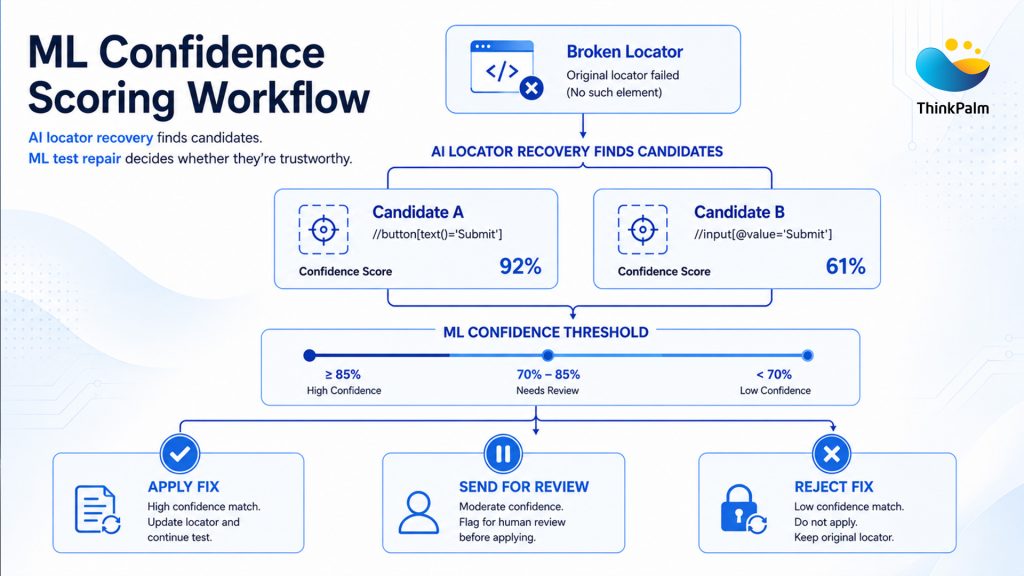
ML confidence scoring workflow: Categorizing element candidates based on reliability thresholds.
For example, as you can see in the image above,
Say the engine finds two possible matches for a missing “Checkout” button. One scores 92% with same text, same position, matching ARIA label. Whereas the other scores 61% similar styling, but different text and page location. Only the first one clears a typical score limit and the system uses it automatically. The second gets flagged for a human to review.
If the top score clears your set limit, the engine uses it and the test continues. If it doesn’t, the step flags the step for a person to check rather than guessing blindly. Choosing where to set that threshold is one of the most important decisions you will make when rolling out an ML test repair strategy.
💡 Best Practice
Start with a high, strict threshold. You can gradually lower it as the system proves it can be trusted. Always keep the threshold highest for critical areas like payments, logins, and data deletion. Because these are the last places you want an AI making guesses.
Every healing event gets logged, whether it succeeded or not which locator failed, what replaced it, the confidence score, and a full difference between old and new.
This isn’t just for compliance. It is a clear window into how self-healing test automation works on a daily basis. A locator that heals every other run is telling you something: the underlying UI component is unstable and needs to be fixed properly in the source code.
Depending on configuration, the engine can update the script automatically, or hand the fix to a QA engineer for approval first. Most teams start in review mode, then switch on auto-update once they trust the scores.
Interested in seeing how AI can support testing beyond self-healing? Explore how AI-powered test case generation helps teams create high-quality test cases faster, the tools involved, and how it works.
Machine learning is what turns self-healing from a rigid fallback list into a system that improves over time. It shows up in a few different ways:
Trained across thousands of UI patterns to determine how closely two elements resemble each other, even when locators change.
The model adapts to your codebase over time, learning which attributes remain stable and reliable within your application.
Distinguishes genuine application defects from environmental noise, helping prevent false positives from cluttering the defect backlog.
Identifies tests that are likely to fail in the future by analyzing commit history, execution patterns, and historical failures.
Self-healing test automation is no longer just a nice-to-have or a trial feature. Organizations now look forward to it when selecting AI-driven software testing tools. The evolution of market now reflects this shift. Gartner’s Magic Quadrant for AI-Augmented Software Testing Tools recognizes AI-augmented testing as a distinct technology category, describing these platforms as “context-aware, data-driven and increasingly autonomous tools” that help engineering leaders deliver higher-quality software faster.
Now that you’ve seen how self-healing works behind the scenes, you may be wondering if it’s the right approach for your team. Our guide to Self-Healing Test Automation Benefits, Challenges and Best Practices looks at the real-world benefits, challenges, and things to keep in mind when putting it into practice.
We, at ThinkPalm didn’t want self-healing to be a bolt-on feature. In TestNova, fingerprinting, recovery, and confidence scoring run as one connected pipeline tuned against real enterprise applications, not demo pages.
Teams using it get configurable confidence thresholds, a full healing log for every test run, and the option to start in human-review mode before switching on auto-update. It plugs into your existing Selenium or Playwright suites, so you’re not rebuilding tests from scratch to get the benefit.
As more companies adopt AI in their testing processes, self-healing is quickly becoming a standard feature in contemporary testing platforms, rather than something reserved for just a handful of early adopters.
There’s a reason for that shift. In traditional automation frameworks, a significant portion of maintenance effort is spent repairing broken locators and updating brittle test scripts rather than uncovering genuine application defects. Self-healing automation addresses this challenge through an intelligent locator strategy that adapts to UI changes, helping teams spend less time maintaining tests and more time improving software quality.
ThinkPalm’s Testing as a Service (TaaS) team can show you exactly how fingerprinting, recovery, and confidence scoring work on your application before you commit to implementation.
Chandni Nadarajan is a content writer at ThinkPalm Technologies, specializing in B2B marketing content. With a passion for turning complex ideas into clear, engaging narratives, she blends strong research and storytelling skills to make technical topics accessible. Her expertise spans technology, automation, and digital business solutions.
One message is all it takes to get started. Tell us what you need, and we’ll take it from there, no long forms, no waiting around.

