 Midhula Jeevan
October 9, 2026
Midhula Jeevan
October 9, 2026
An employee asks your AI assistant to update their bank details. The assistant understands the request, confirms who is asking, and collects the right fields.
Then the payroll API times out.
What happens next decides whether your customers trust the feature. Does the request fail silently? Does a retry create a duplicate record? Or does the case reach a person, with the context they need to finish it?
Your AI did its job. The workflow around it did not.
If you lead product or engineering at an HR tech company, you are probably at this stage right now. The assistant is live, or close. The harder work sits underneath it, and it decides whether your AI roadmap speeds up or stalls. This article is about the engineering that makes it work in production.
HR tech teams that have already shipped AI tell us the same things. The AI may be in production, but making it reliable, scalable, and easier to maintain is where the real work begins.
Every AI demo looks good. The data is clean, there is one system, and nobody asks an odd question. Your customers bring a different set of conditions.
| In the Demo | In Your Customer’s Hands |
|---|---|
| One clean system | HRIS, payroll, ATS, ERP, benefits, time tracking and an identity provider |
| A complete employee record | Missing fields, duplicates and stale values |
| One happy path | Customer-specific workflows and thousands of exceptions |
| Everyone sees everything | Role-based permissions, with salary data restricted |
| The agent answers questions | The agent changes records in systems of record |
| Someone is watching | Logs, alerts and a way to switch a capability off |
The last two rows matter most. A chatbot that gives a wrong answer is an awkward moment. An agent that changes an employee record or triggers payroll activity creates a correction, a complaint or a compliance problem. The more your AI can do, the more the engineering underneath it matters.
A production-ready AI capability needs:
The sections below take these in turn.
Think back to the bank details request that we mentioned in the beginning. To complete it, your agent has to work across several systems. It confirms identity in your identity provider, reads the employee record in your HRIS, writes the new details to payroll, and notifies the employee and their manager. The AI decides what to do. The integration layer makes sure each of those steps actually happens.
HRIS: Records are incomplete or formatted differently from what the agent expects, and customer-specific configurations vary.
ATS: Candidate data is duplicated, outdated or mapped inconsistently to other systems.
Payroll: Requirements are strict. A missing field or a mismatched format means the request is rejected, or only partly applied.
Third-party APIs: Timeouts, rate limits, expiring credentials and partner API changes can break a working flow without warning.
Loudly. The payroll API times out or rejects the request because a required field is missing, or the record does not match the format it expects. The request fails and everyone can see it.
Partially. The HRIS accepts the change, but payroll does not. Now two systems disagree about the same employee.
Quietly. A sync fails with no alert, and nobody notices until a wrong payslip arrives weeks later.
In all three cases, the model did not fail. The workflow did. The quiet failure is the most dangerous, because nobody knows there is anything to fix.
A dependable integration layer guards against all three with:
Reuse matters as much as reliability. One agent handles recruitment, another supports payroll, another works with employee data. If each one brings its own connectors and data flows, complexity grows faster than your roadmap. Build integration patterns once and let every agent use them. A standard protocol layer, such as an enterprise MCP server, is one way to give agents a common, secure route into your systems.
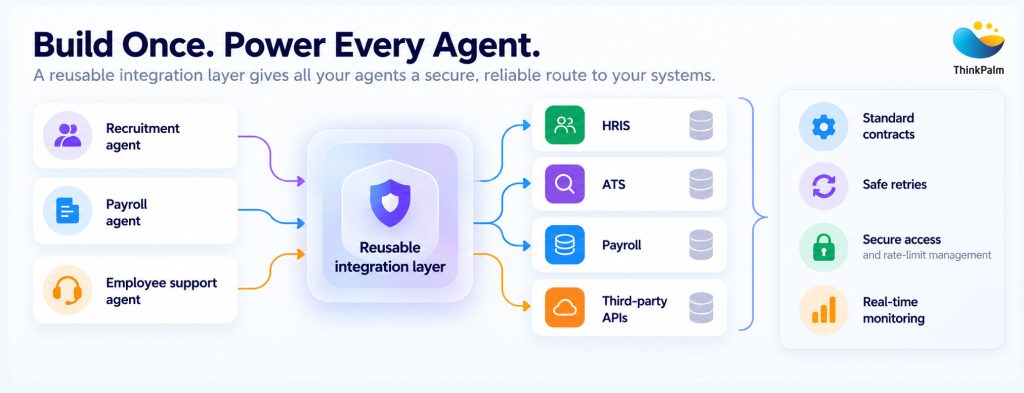
A shared integration layer connects multiple AI agents to enterprise systems securely and reliably.
Our engineers build and maintain API integrations, connectors and middleware for HR and payroll platforms, so your team does not build a one-off connection for every new agent. We design them as reusable patterns with safe retries, error handling, and monitoring built in.
See How We Apply Agentic AI to Payroll →HR is a difficult data environment, and you know it better than most. Employee information sits across several systems. Recruitment data arrives as CVs, assessments, interview transcripts and external feeds. Payroll data has strict accuracy requirements. Customer configurations differ, and acquisitions bring entirely different schemas. Adding AI does not remove these problems. It makes them more visible.
A recruiting example. An AI recruiting assistant ranks candidates. The model may rank well, but if candidate records are duplicated, outdated, or mapped incorrectly between your ATS and other systems, the shortlist suffers.
A payroll example. A payroll assistant works from employee data that is stale or inconsistent between your HR platform and payroll. It acts on that data quickly and with confidence, and the result is a real error with real risk.
An intelligent agent will act on bad data fast. That makes data engineering part of AI engineering.
This layer is often the biggest factor in AI reliability, especially if your platform connects to Workday, SAP, Oracle, payroll applications, or customer-specific tools. Customers who upload data by hand, or who wait on slow imports, will notice it first.
The goal is the right data, in the right format, at the right time, with enough context to act safely.
At ThinkPalm, our data engineering teams build the pipelines behind reliable AI, from ETL (Extract, Transform, Load) and data orchestration to the validation and reconciliation checks that keep records in sync across systems.
Agents create value by acting, and that is where the risk sits. Sorting actions into low, medium, and high risk is a sensible start, but in HR the same action carries different risks in different situations.
| Action | Lower Risk When | Higher Risk When |
|---|---|---|
| Change bank details | Known device, well before the payroll cut-off | Right after a password reset, on a new device, hours before payroll runs |
| Approve a payroll correction | Within the employee’s normal range | Far outside history, or for a senior executive |
| Share employee data | Employees viewing their own record | A manager pulling data across a wide group, or to an external system |
A fixed approval list cannot see these differences. Instead, score each request using the context around it: how close it is to the payroll cut-off, how big the change is compared with the employee’s history, whether their password or device changed recently, and whether the request looks normal for that person.
Then act on the score. Low-risk requests go through. Medium-risk requests need an extra check, such as a confirmation on a second channel. High-risk requests go to a person.
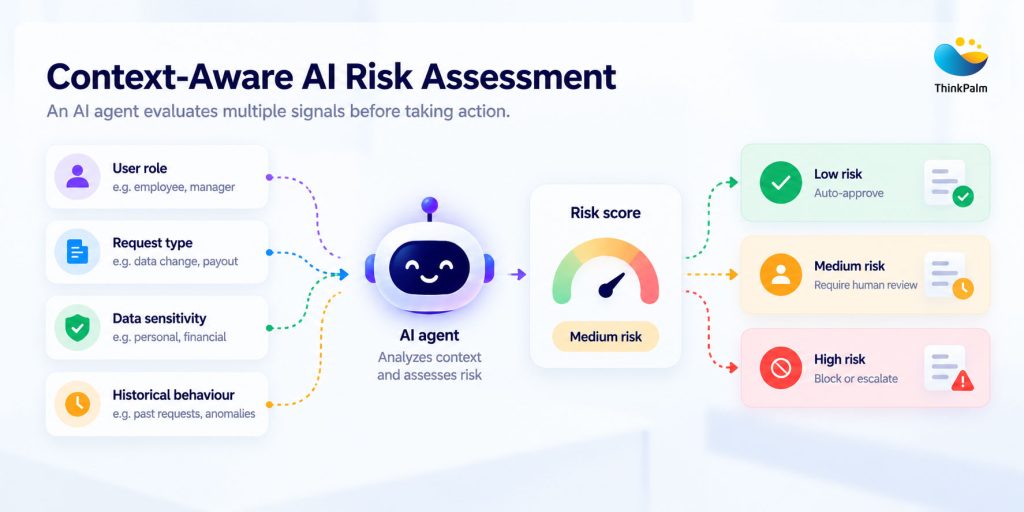
Enabling safer AI decisions through contextual risk evaluation and intelligent approval controls.
A prompt can be argued with. A permission check cannot.
It should only be able to do what the person asking is allowed to do. Also treat text in CVs, tickets and emails as untrusted, because it may contain instructions meant to trick the agent.
Have the agent draft the change and show what will happen. Apply it only after the checks pass or someone approves, and allow an undo where you can.
Show the reviewer exactly what will change, why, and what the agent recommends. If reviewers approve almost everything within seconds, they are not really reviewing. Automate those cases or redesign the review.
Plan for things going wrong, too. Data may be missing; two systems may disagree; a service may be down, or the user may lack permission. In these cases, the agent should hand it over to a person with the full context. It should never guess and carry on.
Finally, keep a record of every action: what the agent did, what data it used, and who approved it. If your customers are UK employers, UK GDPR has rules on automated decisions, and the EU AI Act treats AI used in employment as high-risk. So, this record matters for compliance, not only for debugging.
We build agents with approval steps, escalation paths and full logging from day one.
Explore Our Agentic AI Development Services →AI output varies, and an HR workflow also spans APIs, databases, permissions and external systems. Testing only the AI’s answer leaves most of the chain unchecked.
Take an address change. Beyond “did the AI understand the request?”, test that the agent found the right employee and called the right API, that the connected system accepted and synchronized the change, that the action was logged and the employee confirmed, and what happens when the API fails or the employee lacks permission.
Run these end-to-end tests on every API change, model update, prompt change, and release. Mock partner systems let you test safely, and a set of realistic questions with known answers catches regressions. Our guide on AI testing in HR systems is a good starting point.
Our QA engineers build AI-driven test automation, regression suites and performance testing for HR and SaaS products.
Explore Our Test Automation Services →Your product may be successful, but its architecture may not have been built for AI. Customizations, acquisitions, multiple codebases and older APIs make clean access to data and actions hard, and agents struggle across that patchwork.
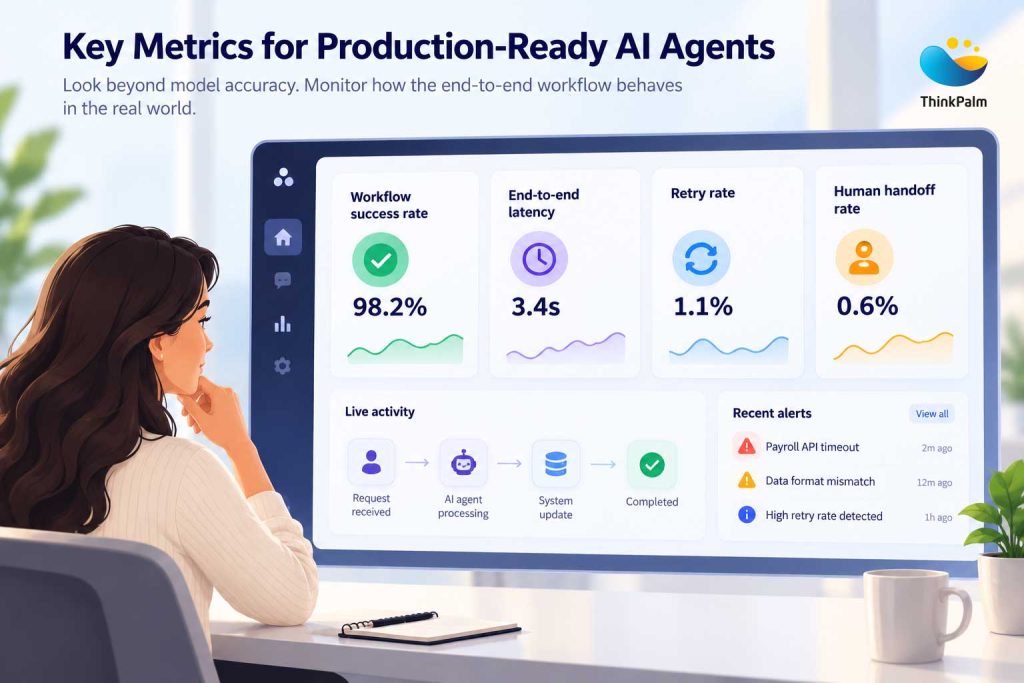
Tracking workflow performance, reliability, and exceptions to keep AI agents production-ready.
Rebuilding everything is slow and risky, and you rarely need to. Instead, look at each part of your platform and choose one of four options:
It works and customers rely on it, so leave it alone.
It is valuable but hard to connect to, so tidy it up until other systems, including AI agents, can use it.
It is holding you back, so swap it for something newer.
It is too risky to touch, so leave the code as it is and add a layer in front of it that new systems can talk to.
Acquisitions raise the stakes, since each product brings its own architecture, data model, and identity system. The way forward is shared data, reusable services, and consistent authentication, not a new interface on top. Our guide to legacy system modernization with AI explains the steps. Then keep AI from becoming another isolated layer:
We help you integrate AI across both legacy and newer systems without breaking either. Our dedicated product engineering teams and AI-led modernization cover everything from API layers around legacy code to refactoring and integrating acquired products.
Pick one workflow your AI agent handles today, such as updating an employee’s address. Then read through the checklist below and ask whether each statement is true for that workflow. Every statement you cannot tick is a gap, and the best place to start fixing.
Adopting AI is no longer the hard question for HR tech. The hard question is whether it works reliably with your customers’ systems, data and exceptions, and whether you can test and scale it without destabilizing the product.
AI may be what customers see. The engineering underneath is what makes them trust it.
Which of your AI workflows is hardest to keep stable? Let’s look at it together, and work out what stands between it and production.
Midhula Jeevan is a passionate content writer with a focus on SEO and technical writing. With a love for words and a curiosity for the technical side, she blends creativity with strategy to craft content that stands out. When not writing, you could find her usually reading books, enjoying a good cup of coffee, or chasing golden sunsets.
One message is all it takes to get started. Tell us what you need, and we’ll take it from there, no long forms, no waiting around.

