From Packets to Python: How Wi-Fi Test Automation Is Transforming Wireless Testing
Wireless Testing
 Nimmy Varghese
July 3, 2026
Nimmy Varghese
July 3, 2026



 Nimmy Varghese
July 3, 2026
Nimmy Varghese
July 3, 2026
Not long ago, testing a Wi-Fi router meant hours of staring at packet captures, watching throughput graphs, and waiting to catch one dropped signal during a roam. Engineers called it “the stare.” It worked when Wi-Fi was simpler, but it doesn’t work anymore.
Wi-Fi 7, known by its technical name 802.11be, changes the game. New features multiply the ways a device can connect, fail, or behave differently.
Features such as Multi‑Link Operation (MLO), 4096‑QAM, and 320 MHz channels expand the validation matrix across bands, modes, and client platforms. Teams that move fastest replace manual checklists with Python-driven automation and reproducible pipelines.
Testing every combination by hand isn’t realistic anymore. This is why Wi-Fi test automation has moved from a nice extra to a must-have skill for every wireless engineer.
In the Wi-Fi 5 era, testing a router often felt linear. In Wi-Fi 7, a single access point may operate across 2.4 GHz, 5 GHz, and 6 GHz at the same time, and validating link failover across those combinations is hard to do consistently by hand. Wi-Fi 7 complexity turns “one more manual run” into compounding risk, and automation is the only way to keep coverage and confidence rising together.
Repetition, RF precision, and Wi-Fi 7 scale have pushed automation from “nice to have” to non-negotiable. The matrix explodes across bands, channel widths, security modes, feature flags like OFDMA and TWT, firmware branches, and client OS combinations. A well-built WiFi 7 testing framework, running real 802.11be test automation, gives a reliable way to validate Wi-Fi performance consistently across repeated runs.
Want to go deeper on what stability testing actually involves? Read our guide: A Short Guide on Wi-Fi Device Stability Testing Fundamentals.
Wi-Fi 7 makes manual validation harder by combining Multi-Link Operation, puncturing, and 6 GHz operation into an already large test matrix. Multi-Link Operation (MLO) lets a device use more than one band at once, so testers now have to check link failover, scheduling, and behavior across simultaneous links, not just a single connection.
Puncturing lets a device skip over a noisy slice of a wide channel instead of dropping the whole channel, which adds more RF and channel-condition paths to validate. Add 6 GHz operation to that mix, and the validation matrix expands further across channel availability, client capability, regulatory behavior, and coexistence conditions.
So why does manual testing fail at Wi-Fi 7 scale? The short answer is that there are too many bands, too many security modes, and too many feature combinations to check one by one without missing something.
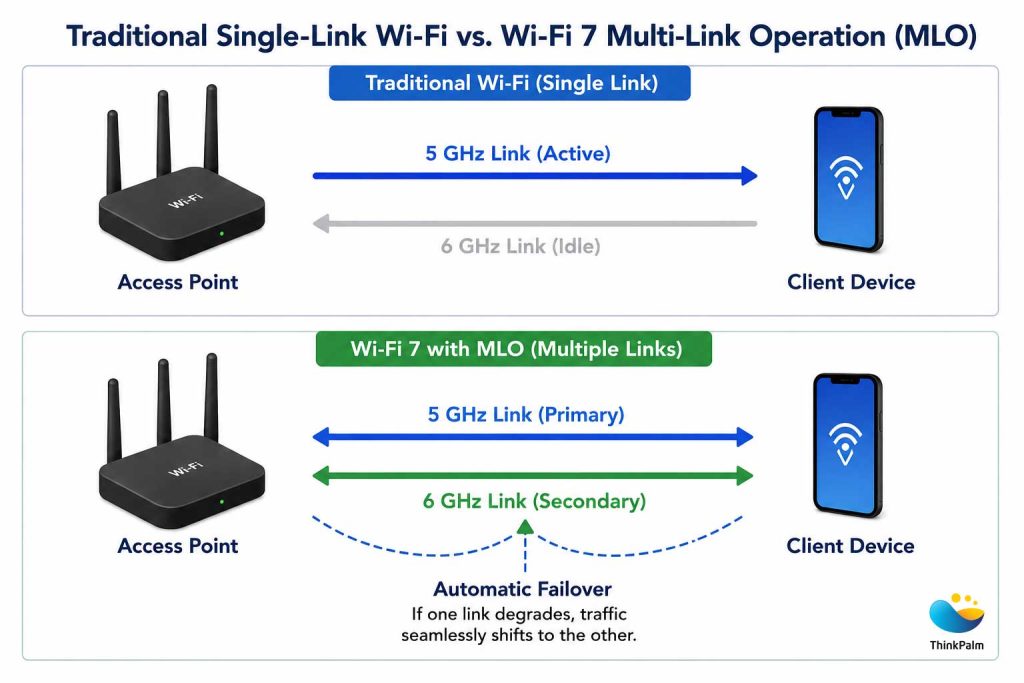
Wi-Fi 7 MLO improves reliability through concurrent wireless links
Definition
Wi-Fi test automation is the use of Python-driven scripts and automated workflows to execute wireless tests without manual intervention. It automatically validates connectivity, roaming, throughput, security, and device behavior across multiple bands, platforms, and test scenarios, delivering consistent, repeatable, and scalable test results.
Wi-Fi test automation replaces repetitive manual testing with automated, reproducible workflows. A complete automation setup separates test intent from device control and lab infrastructure.
A real Wi-Fi test automation setup separates test intent from device control and lab infrastructure. It includes a test runner like pytest or Robot Framework; platform adapters that handle connect, roam, and config per OS; infrastructure controllers for AP configuration and traffic generation; and an artifact pipeline that stores logs and telemetry per run.
Here is how the two approaches compare.
| What Matters | Manual Testing | Wi-Fi Test Automation |
|---|---|---|
| Speed across combinations | Slow, one at a time | Runs hundreds overnight |
| Consistency | Varies by engineer | Same steps every time |
| Best for | One-off checks | Regression, long-run, certification prep |
| Error risk | Higher, human variability | Lower, scripted and repeatable |
Automating Wi-Fi Testing pays off across several fronts.
Wi-Fi teams rerun the same certification and regression suites across firmware images, AP models, and client SKUs. When done manually, engineers spend most of their time on setup and logging instead of diagnosing failures.
A solid Wi-Fi test automation framework can provision devices, apply test profiles for SSID, security, and channel settings, run the scenarios, and publish results with attached artifacts. The main benefit is repeatability, freeing engineers to analyze patterns and prevent regressions.
Many Wi-Fi tests run in controlled RF setups, like shield boxes and anechoic chambers. Manual execution introduces variability through missed toggles, inconsistent wait times, and small sequencing differences that over hundreds of runs become noise hiding real defects. Automation makes execution deterministic: the same inputs and steps run identically every time, and when a failure occurs, the system can rerun that exact scenario from its recorded metadata.
Wi-Fi ships into many different environments. Devices must work on iOS, Android, Windows, Linux, and embedded stacks, each with its own APIs, power management, and driver quirks. Combined with bands, channel widths, and security modes, the validation matrix quickly outgrows manual workflows.
Automation scales using a generic core plus platform adapter model. Engineers define intent once, then plug in OS-specific adapters: NetworkManager on Linux, WLAN APIs on Windows, adb on Android, and vendor harnesses for iOS rigs.
Some failures only show up under long uptime and repetition, like repeated connect and disconnect cycles or sustained traffic. Typical examples include memory leaks, thermal throttling, and buffer exhaustion, issues that are hard to trigger manually hundreds of times under consistent conditions.
Automation sustains that scale and captures telemetry like temperature, RSSI trends, and driver logs. With clear pass and fail criteria and automatic artifact storage, long-run testing becomes repeatable and auditable.
Before a device can carry the Wi-Fi CERTIFIED label from the Wi-Fi Alliance, it typically goes through pre-compliance testing: internal testing that catches problems before the device is submitted for official certification.
TR-398 is a technical report from the Broadband Forum that defines performance requirements for Wi-Fi access points, including throughput, range, and stability under load.
This is where Wi-Fi certification readiness and automation meet. Running TR-398 tests by hand is slow and easy to get wrong. An automated framework runs the same checks repeatedly and gives engineers real evidence a device is ready before it reaches the Wi-Fi Alliance’s official test lab.
Automation catches failures that slip through manual spot checks: weak roaming under load, throughput that drops near the edge of range, and handshakes that fail intermittently. Catching these during pre-compliance is far cheaper than a formal certification retest.
Curious how pre-compliance testing actually works in practice? See how ThinkPalm implements it: Wireless Pre-Compliance Testing: How Does ThinkPalm Implement It?
A scalable Wi-Fi automation framework separates test intent from device control and lab infrastructure, keeping tests readable while staying flexible as new features arrive.
Example: provision device and AP to known versions, enable MLO on 5 and 6 GHz with WPA3, sweep attenuation in steps, run 300 roam cycles under load, and attach packet captures plus logs while classifying failures by type (auth, DHCP, roam, throughput).
Parameterized scenarios for band, channel, security, and feature flags, each with clear pass and fail criteria.
Connect, roam, RSSI stats, power state, and crash collection per platform.
AP config, MLO and DFS policies, traffic, and multi-client load.
Logs, counters, thermal telemetry, and packet captures tied to a run ID.
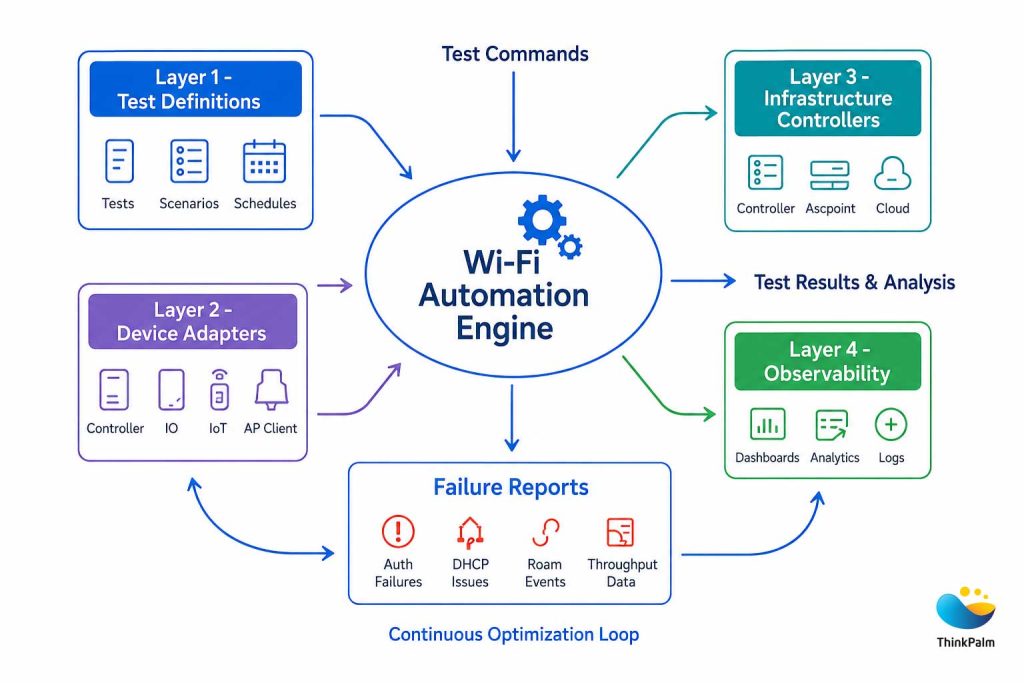
A Layered Wi-Fi Test Automation Framework
Choosing the right tools is just as important as deciding to automate. While there is no single technology stack that fits every lab, most successful teams rely on Python because of its simplicity, flexibility, and extensive ecosystem of networking and automation libraries. From controlling devices and configuring access points to analyzing packet captures and integrating with CI/CD pipelines, Python provides a common language for building scalable Wi-Fi test automation solutions.
The following components form a practical and reliable WiFi automation testing framework that can grow alongside your testing needs.
When it comes to Wi-Fi testing using Python, pytest and Robot Framework are two of the most widely adopted test runners. Both support automated wireless validation, but they serve different needs.
pytest is often the preferred choice for engineering teams building custom 802.11be test automation. It offers powerful fixtures, parameterization, and plugin support, making it ideal for complex regression suites and highly customized test logic.
Robot Framework, on the other hand, uses a keyword-driven approach that makes tests easier to read and maintain. It is well suited for cross-functional teams where QA engineers, validation teams, and automation engineers collaborate.
Choose pytest when flexibility and deep customization are priorities. Choose Robot Framework when readability, collaboration, and rapid onboarding matter most.
A reliable Wi-Fi test automation framework must communicate with devices across different platforms. Android devices are typically controlled using adb, Linux systems through SSH, Windows via WLAN APIs, and iOS or embedded platforms through vendor-specific harnesses. Abstracting these platform-specific commands behind reusable adapters allows the same test logic to run across multiple operating systems.
Real-world WiFi 7 testing requires more than checking connectivity. Tools like iperf3 measure TCP and UDP throughput, while TRex generates large-scale traffic to simulate multiple clients. High-end labs may also use dedicated hardware traffic generators to validate Multi-Link Operation (MLO), roaming performance, and high-throughput wireless scenarios.
Every automated test should generate useful evidence. A mature pipeline automatically stores packet captures (pcaps), logs, telemetry, screenshots where needed, and JUnit XML reports. Dashboards then visualize trends across firmware versions, making it easier to reproduce failures, monitor regression results, and improve Wi-Fi certification readiness.
Want to see the business case in numbers? Find out how pre-compliance testing directly impacts your bottom line: How Pre-Compliance Testing Can Increase ROI for Wireless Devices.
Integrating Wi-Fi test automation into CI/CD pipelines helps engineering teams detect issues earlier, continuously validate firmware changes, and shorten release cycles. Instead of waiting until the end of development, every firmware build is automatically validated through the CI/CD pipeline.
Every firmware update should automatically trigger smoke tests followed by regression suites. This ensures that core features such as connectivity, roaming, authentication, throughput, and Multi-Link Operation (MLO) continue to work as expected. Early feedback allows developers to fix issues before they reach later testing stages.
As automation scales, multiple teams often share the same lab equipment. Device reservation systems prevent conflicts, while automated schedulers maximize hardware usage. Resetting devices, access points, and network configurations before every run ensures consistent results and improves the reliability of WiFi 7 testing.
Reliable automation depends on reproducible results. Store firmware versions, driver details, test configurations, and packet captures for every execution. Rather than ignoring intermittent failures, treat flaky tests as defects. This approach improves debugging and builds confidence in your Wi-Fi test automation framework.
Wi-Fi 7 (802.11be) raises the bar for validation. Multi-Link Operation (MLO) introduces new connection modes and scheduling behavior. Puncturing changes how channels are used under interference, and higher throughput expectations increase sensitivity to driver, firmware, and power-management issues. Dense IoT deployments like smart warehouses, factories, and industrial IoT add scale and coexistence challenges that manual spot checks won’t cover.
Automation pays for itself by expanding coverage, shortening developer feedback loops, and reducing the rate of customer-discovered defects. Rather than chasing a single headline metric, teams build evidence across platforms and conditions that behavior remains correct as firmware changes.
In practice, ROI shows up as fewer late surprises: more issues found per build, faster root-cause isolation, and fewer “can’t reproduce” loops between test and development.
Wi-Fi 7 validation demands more than good scripts. It requires the right lab setup, the right tools, and engineers who have done it before. If you want to see what that looks like in practice, explore ThinkPalm’s wireless testing lab infrastructure and capabilities.
Successful Wi-Fi test automation is built on good engineering practices. Keep test logic modular, separate platform-specific code through reusable adapters, and version-control configurations alongside automation scripts. Capture logs and packet captures for every run, not just failed tests. Most importantly, treat flaky tests as defects instead of accepting them as normal. These principles make a WiFi automation testing framework easier to maintain, scale, and trust.
ThinkPalm is a wireless testing partner for chipset manufacturers, OEMs, Wi-Fi service providers, 5G operators, and enterprises. Their advanced Wi-Fi testing labs cover the full range of validation needs, from early pre-compliance runs to full regression suites, using RF chambers, variable attenuators, and the Candela TR-398 Automation Suite with LANforge technology.
On the automation side, ThinkPalm uses Python, PyLatex, and Scapy for WLAN packet simulation across Wi-Fi 6, Wi-Fi 6E, and 802.11ax environments. Their services span performance, security, stability, interference, functionality, and pre-compliance testing, with compatibility coverage for EasyMesh 2.0, OpenSync API, and RDKB API.
For teams looking to accelerate Wi-Fi certification readiness or build a Wi-Fi Automation testing framework without standing up a lab from scratch, ThinkPalm brings the infrastructure, tooling, and domain expertise to get there faster.
If you are a Wi-Fi test engineer, Wi-Fi test automation is no longer a side project. It is a core test skill. Start with one workflow, like device provisioning, connect and roam validation, or log collection, and automate it end to end. Then scale by standardizing test data, building reusable libraries, and adding observability, so every run produces actionable evidence.
Quick engineering checklist to keep runs reproducible and failures actionable:
In the Wi-Fi 7 era, the challenge is no longer running a single test successfully. It is proving reliability across thousands of combinations, repeatedly and predictably. The engineers who thrive will be the ones who treat Wi-Fi test automation not as a supporting tool, but as a core engineering discipline.
Nimmy Varghese is a Wi-Fi Test Engineer focused on Wi-Fi standards validation and certification testing. Her work involves validating wireless features, interoperability, protocol compliance, end-to-end connectivity, and optimizing test workflows for next-generation Wi-Fi devices.