QUIC Protocol Explained: How HTTP/3 Replaces TCP for Faster, Secure Web Performance
Networking
 Deepanraj Pounraj
May 29, 2026
Deepanraj Pounraj
May 29, 2026



 Deepanraj Pounraj
May 29, 2026
Deepanraj Pounraj
May 29, 2026
Think about the last time a webpage loaded almost instantly, or a video call stayed stable while you switched from Wi-Fi to mobile data. That experience is not accidental. Much of it comes down to the QUIC protocol, short for Quick UDP Internet Connections, a modern transport protocol built to fix the speed and reliability gaps that Transmission Control Protocol (TCP) was never designed to handle.
In combination with HTTP/3, QUIC enables browsers and applications to transmit multiple information streams at the same time, eliminate delays in handshakes, and provide a secure connection, all while providing a seamless experience even in high-traffic or unpredictable environments.
At a Glance
Read on to understand what the QUIC protocol is, its working, its replacement of the conventional TCP, and how it has been utilized in HTTP/3 to provide a faster, more efficient, and secure web experience for users and organizations.
QUIC (Quick UDP Internet Connections) is a modern transport protocol that aims to provide faster, more reliable, and more secure internet communication compared to traditional TCP. It was created by Google and standardized by the IETF in RFC 9000. It is built on top of the User Datagram Protocol instead of TCP and provides its own reliability, congestion avoidance, and recovery techniques.
However, then on June 7, 2022, the IETF published QUIC-based HTTP/3 as a Proposed Standard in RFC 9114.
Interested in how modern protocols are pushing the limits of TCP? Explore our deep dive into Multipath TCP (MPTCP).
At its core, QUIC replaces the traditional multi-layer approach of TCP plus TLS by folding connection setup, security, and data transfer into a single protocol. Instead of completing a TCP handshake and then negotiating encryption separately, QUIC does both in one go using TLS 1.3, which means less waiting and a faster path to actually transferring data.
For a first-time connection, this process takes just 1-RTT, or one round trip between the client and server. For returning users who have connected before, QUIC supports 0-RTT, where data transfer begins immediately with no handshake delay at all. That single difference has a measurable impact on how fast pages feel, especially on mobile networks where every millisecond counts.
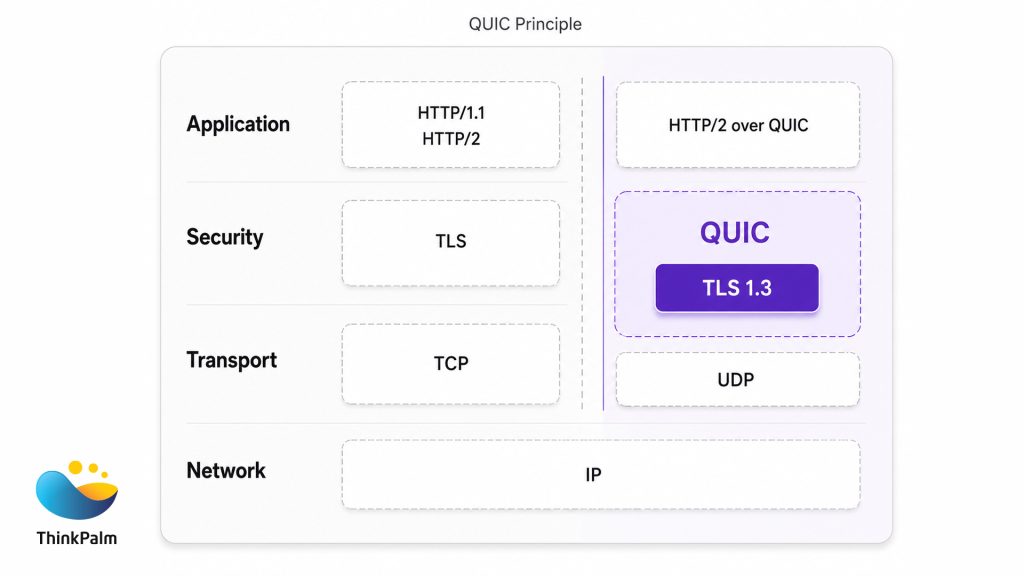
QUIC streamlines transport and security to deliver faster, low-latency web communication.
Once a connection is live, QUIC sends data in structured packets rather than a continuous byte stream the way TCP does. Each packet follows the same basic anatomy:
QUIC Packet = Header + Packet Number + Encrypted Payload (Frames)
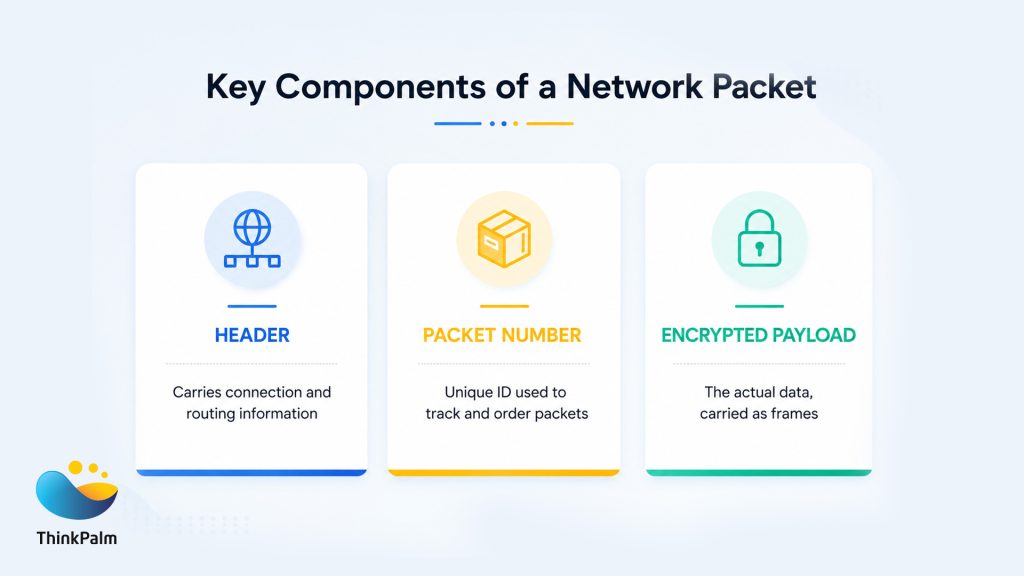
QUIC packets combine secure data delivery with efficient packet tracking and routing.
QUIC uses two packet formats depending on where you are in the connection lifecycle:
During the initial phase of communication, QUIC uses long header packets, which contain more information needed to establish the connection.
These packets include:
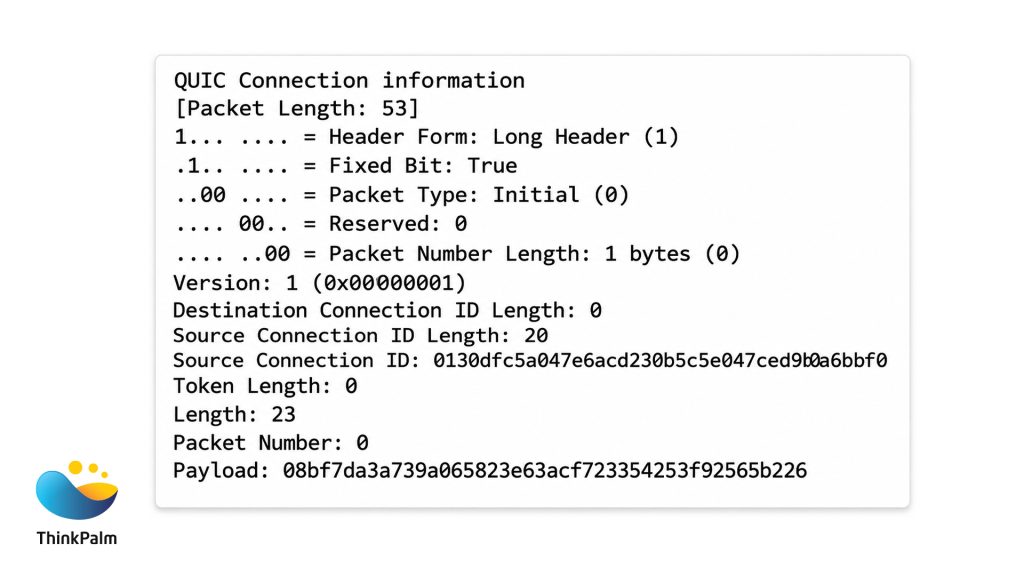
A sample QUIC packet structure showing connection details, packet metadata, and encrypted payload information.
These packets are used for:
Although they are larger in size, they are essential for securely establishing the connection.
Once the connection is established, QUIC switches to short header packets, which are optimized for speed and efficiency.
These packets include only minimal fields:
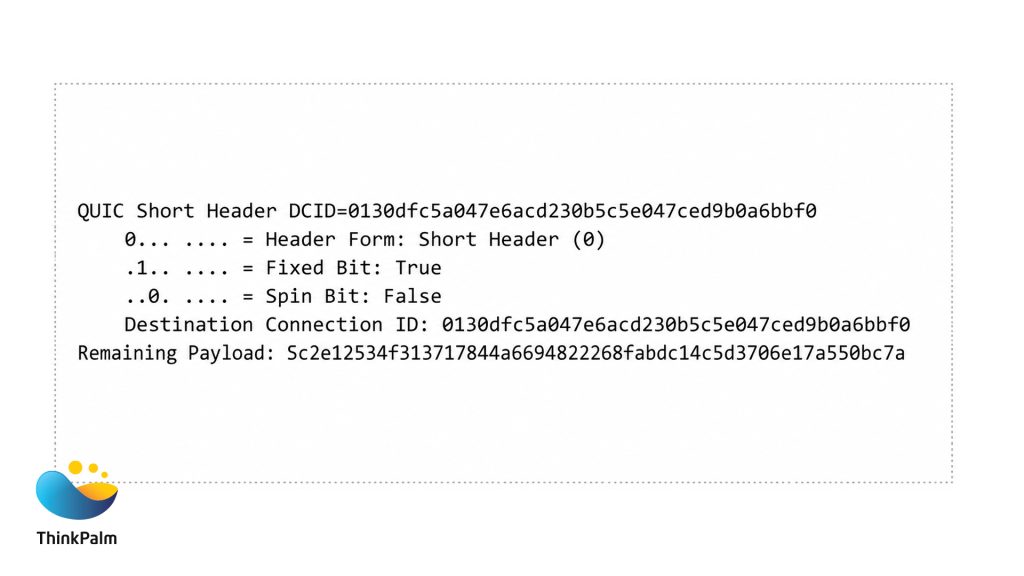
A QUIC short header packet for faster data transmission.
Because they are smaller, they reduce overhead and allow faster data transmission during normal communication.
Long header packets carry everything needed to establish and authenticate a connection. Once that is done, QUIC switches to the leaner short header format, which strips out unnecessary fields and keeps data moving as efficiently as possible.
Curious how modern protocols approach security from the ground up? Explore our guide to WireGuard VPN.
The QUIC handshake runs in three phases, aligned with the cryptographic epochs of TLS 1.3. Unlike the separate TCP and TLS handshakes that TCP requires, QUIC completes authentication and encryption setup in a single exchange, with forward secrecy built in by default.
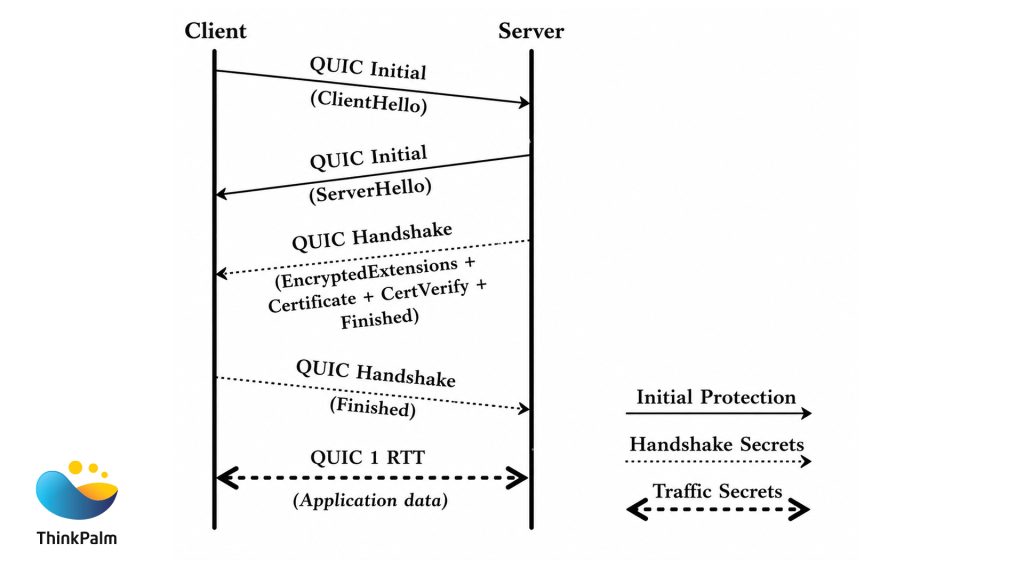
QUIC handshake flow showing secure connection establishment and 1-RTT data transfer in HTTP/3.
One important detail: recent versions of QUIC encrypt even the Initial Hello packets, so network intermediaries cannot inspect or interfere with the handshake in transit. That is a meaningful security improvement over TCP, where header information has historically been visible to anyone on the path.
TCP has powered the internet for decades, and it did the job well when web traffic meant simple text pages and emails. But the internet today is mobile-first, media-heavy, and deeply sensitive to latency. TCP was not built for any of that, and the gaps show. That is the core reason the QUIC protocol exists.
Before we get into the detail, here is a quick side-by-side of what changes when you move from TCP to QUIC.
| AREA | TCP | QUIC |
| Transport layer | OS Kernel – Slow to update, requires system-level changes | User Space – Deployable anytime, no OS update needed |
| Connection setup | 2+ round trips – Three-way handshake + separate TLS negotiation | 1-RTT / 0-RTT – Combined handshake; returning users connect instantly |
| Encryption | Add-on – TLS layered on top; headers exposed on the network | Built in – TLS 1.3 native; headers and payload fully encrypted |
| Multiplexing | Blocked – One lost packet stalls the entire connection | Independent – Streams are isolated; packet loss stays contained |
| Congestion control | Fixed – Hardcoded in kernel, difficult to change | Pluggable – Cubic, BBR, Reno or custom — switchable per connection |
| Network switching | Session drops – Tied to IP + port; switching networks breaks the session | Migrates – Connection ID persists across network changes |
| Retransmission | Stream-wide – Entire stream waits for the one lost packet | Targeted – Only the lost packet is resent; everything else continues |
Here is what each of those differences looks like in practice.
TCP is built directly into the operating system kernel. It manages error correction, retransmission, congestion control, and ordering automatically, but updating it requires changes to the OS itself. That makes experimentation slow and deployment risky.
QUIC, running over UDP (User Datagram Protocol), operates in user space instead. Developers can update and improve the QUIC protocol without waiting for an OS update, which is a significant structural advantage when the web is evolving as fast as it is today.
Every TCP connection starts with a three-way handshake, and if you are on HTTPS, a separate TLS negotiation follows. That is multiple round trips before a single byte of content reaches the user.
QUIC folds both into one exchange. A new connection completes in a single round trip. A returning user’s connection completes in zero. That difference is felt every time a page loads, a stream buffers, or an API call fires.
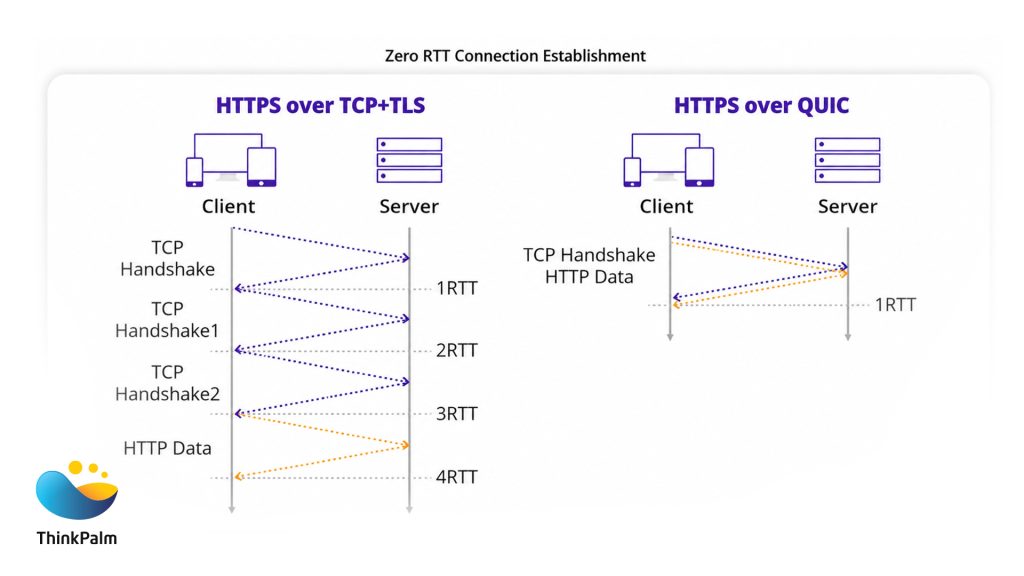
QUIC reduces connection setup latency by combining transport and encryption handshakes into fewer RTTs.
With TCP, encryption is an add-on. TLS sits on top of the connection, which leaves TCP headers visible to anyone on the network path. That creates both a privacy gap and extra latency from the separate negotiation.
QUIC integrates TLS 1.3 directly. Headers, payloads, and the handshake itself are all encrypted. Network intermediaries cannot inspect or tamper with a QUIC connection, which makes it significantly harder to eavesdrop on or manipulate in transit.
TCP delivers data as a single ordered stream. If one packet goes missing, everything behind it waits, even if those subsequent packets arrived perfectly and are ready to use. This is head-of-line blocking, and it is one of TCP’s most painful limitations in practice.
QUIC solves this through multiplexing across independent streams. Each stream operates on its own, so a missing packet in one stream has zero effect on the others.
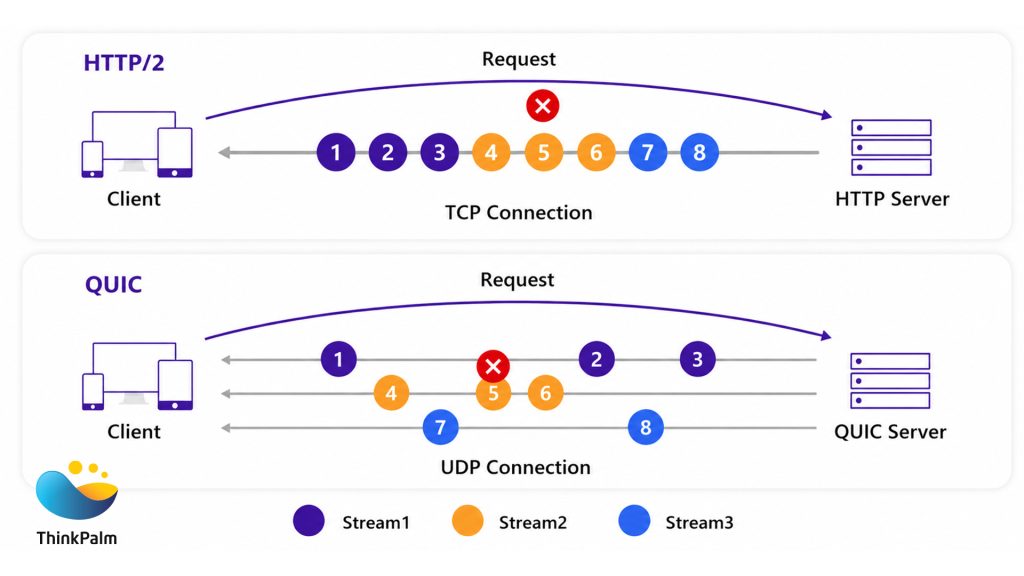
QUIC eliminates head-of-line blocking by handling streams independently over UDP.
Real-world example
On a video streaming platform, a packet loss event affecting video frames will not delay the audio stream. Playback stays smooth rather than stuttering while the missing packet is recovered.
TCP’s congestion control is baked into the kernel. Swapping algorithms requires a system-level update, which is why most networks still run the same logic they did years ago. QUIC treats congestion control as a pluggable component.
Cubic, BBR, Reno, or any custom algorithm can run in user space, and different connections within the same application can each use a different one. Updates apply without downtime, which means performance can adapt far more quickly to changing network conditions.
TCP identifies every connection by its IP address and port number. Switch networks and the connection breaks, forcing a full reconnection from scratch.
QUIC uses a connection ID instead, which is independent of the underlying network path. When your device moves from Wi-Fi to 5G, the connection ID stays valid and the session carries on without interruption.
Real-world example
A user mid-call switches from Wi-Fi to mobile data. With QUIC’s connection migration, the call continues without dropping. With TCP, the connection terminates and has to be re-established from the beginning.
TCP uses sequential byte streams with cumulative acknowledgements. When a packet is lost, the entire stream waits for that specific packet before anything after it can be processed.
QUIC assigns a unique number to every packet and uses acknowledgements to pinpoint exactly what went missing. Only that packet is retransmitted, and everything else keeps moving. On networks where packet loss is intermittent rather than severe, this targeted approach makes a real difference in perceived performance.
TLS 1.3 powers the secure foundation behind QUIC today, but the next wave is already emerging. Read our breakdown of Post-Quantum TLS with ML-KEM.
Understanding how QUIC works at a technical level is one thing. Seeing what it actually changes for a person loading a page, streaming a video, or switching networks mid-session is another.
That is where HTTP/3 comes in. It takes the transport-layer improvements that QUIC provides and turns them into real, measurable gains in how websites and applications feel to use.
Here is what that looks like across the scenarios that matter most.
HTTP/3 allows browsers to load websites more efficiently:
Users watching videos or participating in live events notice fewer interruptions:
Mobile users benefit from continuous sessions across changing networks:
Switching from Wi-Fi to cellular no longer causes dropped connections.
Apps like video conferencing, remote collaboration tools, or music streaming services can continue without reconnections.
This real-time reliability is especially important in urban environments, trains, or buses where network conditions fluctuate.
HTTP/3 ensures security without slowing the user experience:
HTTP/3 over QUIC brings measurable business value:
Faster page loads and reduced buffering increase engagement and reduce churn for websites and apps.
More resilient mobile performance means users can access services seamlessly anywhere.
Secure by default protects both company data and user privacy, building trust.
In essence, HTTP/3 is the practical, real-world evolution of web protocols. While QUIC solves technical problems at the transport layer, HTTP/3 translates those improvements into smoother browsing, faster streaming, and safer online interactions for everyday users.
The technical differences between HTTP/3 over QUIC and HTTP/2 vs HTTP/3 are meaningful on paper, but what do they actually look like when measured against real usage? The table below breaks down six of the most common web scenarios and shows what changes when you move from HTTP/2 over TCP to HTTP/3 over QUIC.
| Use Case | HTTP/2 over TCP | HTTP/3 over QUIC | Observed improvement |
| Page load time | 3.2 seconds on average; assets load sequentially, head-of-line blocking adds delay | 2.4 seconds on average; parallel asset loading with no stream blocking | ~25% faster. Significant lower latency on large, media-heavy pages |
| Video streaming | Frequent buffering on weak or congested networks; packet loss stalls the whole stream | Smooth playback with fewer interruptions; independent streams keep audio and video separate | 30–40% less buffering. Buffering reduction even on unstable connections |
| Mobile network switching | Sessions drop when moving between Wi-Fi and 4G or 5G; full reconnection required | Connection ID keeps the session alive across network changes; playback or calls continue uninterrupted | 100% session continuity. Full session continuity with zero reconnection drops |
| Online gaming and real-time apps | Lag spikes caused by packet loss; TCP’s ordered delivery makes delays compound | Low-latency, uninterrupted gameplay; QUIC’s targeted retransmission keeps other streams moving | 20–30% lower latency. Smoother gameplay and reduced online gaming latency |
| Security and privacy | TCP headers unencrypted; separate TLS negotiation adds overhead and latency | Full encryption of headers and payloads by default; TLS 1.3 built into the connection | Stronger by default. Better security with no added latency cost |
| Repeat visits | New handshake required on every visit; no way to skip the connection setup overhead | 0-RTT resumes sessions instantly; content begins loading before the handshake completes | Instant load. Pages start delivering content immediately on repeat visit speed |
Most modern browsers, including Chrome, Edge, and Vivaldi, already have QUIC enabled by default. However, if you want to manually enable or disable it, you can do so using browser flags:
This is useful for developers, network engineers, or anyone testing HTTP/3 websites and QUIC performance.
You can easily verify whether a website is using QUIC and HTTP/3 using your browser’s developer tools:
Steps:
This method helps you quickly identify HTTP/3 adoption across different websites and test your browser’s QUIC performance in real time.
Adopting QUIC and HTTP/3 also means validating them thoroughly in real-world environments. Explore our insights on the future of network protocol testing.
The QUIC protocol and HTTP/3 are not just incremental updates to how the web communicates. They are a fundamental rethink of what a modern connection should look like. By replacing TCP’s aging foundations with faster handshakes, built-in encryption, and seamless mobile-first web experiences, QUIC addresses the exact pain points that today’s users and businesses run into every day.
For latency-sensitive applications like video streaming, gaming, and real-time collaboration, the gains are immediate and measurable. As the web continues to grow more demanding, HTTP/3 over QUIC is quickly becoming the standard that web performance and secure internet expectations are built around. Whether you are a developer, a business, or simply someone who wants a faster web, the future of internet protocols is already here.
The QUIC protocol, combined with HTTP/3, is not a minor iteration on what came before. It is a genuine step forward in how the internet handles speed, reliability, and security. By tackling the core limitations of TCP, such as slow handshakes, head-of-line blocking, and unencrypted headers, QUIC lays the groundwork for a web that performs the way users today actually expect it to.
As the web keeps evolving, HTTP/3 over QUIC is fast becoming the baseline that modern web performance is measured against. For developers, businesses, and everyday users, the future of internet protocols is not on the horizon. It is already here.
At ThinkPalm, we offer end-to-end consulting and development services to help businesses navigate the shift to modern web protocols like HTTP/3 and QUIC. Whether you are assessing your current infrastructure, planning a migration, or building a new product that needs to perform at scale, our team brings the expertise to take you from strategy to implementation.
For most modern use cases, yes. QUIC connects faster, encrypts everything by default, and handles network switches without dropping sessions. TCP is still widely supported but was built for a simpler internet. For anything latency-sensitive or mobile-heavy, QUIC is the stronger choice.
HTTP/2 runs over TCP and inherits its limitations, including head-of-line blocking and unencrypted headers. HTTP/3 runs over QUIC, which fixes all of that. The result for users is faster page loads, less buffering, and more reliable connections on mobile.
Most likely, yes. Chrome, Edge, Firefox, and Safari all support HTTP/3 by default. To check, open developer tools, go to the Network tab, and look for “h3” in the Protocol column.
Yes. HTTP/3 over QUIC uses TLS 1.3 by default, covering both headers and payloads. Encryption is mandatory, not optional, making it one of the more secure communication protocols in use today.

Deepanraj Pounraj is a data communication protocol developer with expertise across the networking stack—from the data link layer to the application layer. He specializes in building secure and efficient communication systems for embedded, IoT, and enterprise networks.