The 6 GHz band, introduced with Wi-Fi 6E and enhanced in Wi-Fi 7, brought a massive expansion of usable spectrum.
But it also introduced a quiet engineering challenge.
How does a client efficiently find an AP in a band with 59 possible 20 MHz channels?
In 2.4 GHz and 5 GHz, active scanning was fast and predictable. A client could sweep across channels in milliseconds and quickly build a candidate list. The limited spectrum made this approach simple and effective.
In 6 GHz, that same approach becomes slow, power-hungry, and disruptive to roaming performance. What worked well in a narrow band becomes a liability in a wide one.
This is where 6 GHz WiFi discovery takes a completely different approach. Scaling spectrum required scaling intelligence. And that is exactly where a new generation of smarter discovery mechanisms comes in.
In a Nutshell
The 6 GHz band gives Wi-Fi 6E and Wi-Fi 7 more spectrum than ever before. But with 59 possible channels to search across, finding an Access Point the old way is too slow and too power hungry. That is why 6 GHz WiFi discovery uses smarter mechanisms like RNR, PSC, FILS, and Unsolicited Probe Responses to help clients find APs faster and more efficiently.
Read on to understand how Wi-Fi 6E and Wi-Fi 7 solve the 6 GHz WiFi discovery challenge with smarter, faster, and more efficient mechanisms.
To understand the problem, it helps to know how wireless network discovery worked before 6 GHz arrived.
When a Wi-Fi client wants to find an Access Point, it has two options. It can listen quietly for beacon frames that APs broadcast automatically. This is called passive scanning. Or it can send out probe requests and wait for APs to respond. This is called active scanning.
In the 2.4 GHz and 5 GHz bands, active scanning was the go-to approach. The spectrum was limited, the number of channels was small, and a client could sweep through all of them in milliseconds. It was fast, reliable, and nobody had a reason to question it.
In 6 GHz, that same approach runs into a wall.
With 59 possible 20 MHz channels to search across, active scanning suddenly becomes a very expensive operation. Every extra channel adds time, energy, and overhead to a process that used to feel instant.
The passive vs active scanning tradeoff that once felt like a minor design choice suddenly becomes a much bigger conversation in 6 GHz.
So instead of brute-force scanning, the Wi-Fi ecosystem introduced smarter discovery mechanisms. These methods fall into two broad categories: out-of-band discovery and in-band discovery. Each one tackles the problem from a different angle, and together they make 6 GHz WiFi discovery fast, efficient, and practical.
Want to understand how Wi-Fi certification ensures these standards are met in real devices? Read our guide on 802.11ax WFA Certification & Pre-Certification Testing.
The most preferred approach among vendors today is out-of-band discovery. And once you understand how it works, it is easy to see why.
Think of it like this. Instead of wandering through an unfamiliar city looking for a specific restaurant, someone who has already been there hands you the exact address. You go straight there. No searching, no guessing, and no wasted time.
That is exactly what out-of-band discovery does for 6 GHz WiFi discovery.
Rather than forcing the client to search blindly across all 59 channels in the 6 GHz band, the Access Point advertises its 6 GHz presence through its 2.4 GHz or 5 GHz radios. The client is already listening on these legacy bands. So instead of searching in the dark, it receives a helpful pointer before it even begins.
This is made possible by the Reduced Neighbor Report (RNR), introduced in IEEE 802.11v and widely adopted in Wi-Fi 6E deployments.
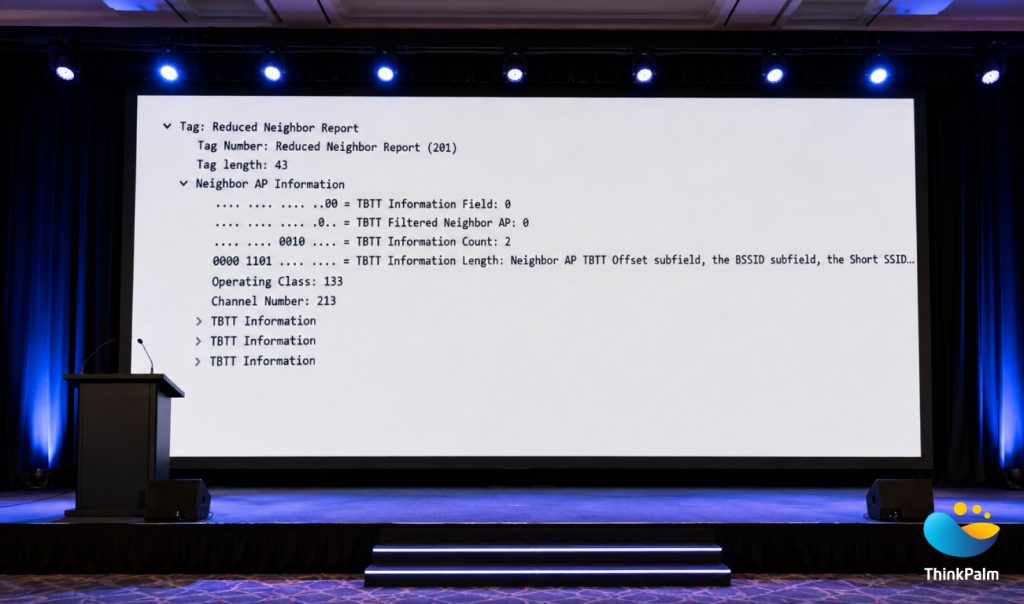
Reduced Neighbor Report Enabling 6 GHz AP Discovery
When an AP sends a beacon on the 2.4 GHz or 5 GHz band, it can include an RNR element inside that beacon. This element carries key information about a co-located 6 GHz BSS, including:
In simple terms, the beacon tells the client: “There is a 6 GHz AP available right here, and this is exactly where to find it.”
The client does not need to scan the entire 6 GHz band. It simply tunes directly to that specific channel and connects. The heavy lifting is done before the search even begins.
The benefits of the Reduced Neighbor Report go beyond just saving a few milliseconds.
This combination of speed, efficiency, and roaming performance is exactly why out-of-band discovery via RNR has become the dominant strategy in real-world Wi-Fi 6E deployments today.
Now, let’s look at what happens if out-of-band information is not available. The client must search within the 6 GHz band itself. This is where 6 GHz WiFi discovery relies on smart optimizations instead of scanning all 59 channels blindly.
To make scanning efficient, 15 specific channels are designated as Preferred Scanning Channels (PSC). These channels are spaced across the 6 GHz spectrum, and APs are encouraged to operate on them.
Think of it like a city with 59 streets but only 15 main roads. If you know most of the action happens on those 15 main roads, you skip the side streets and get to where you need to be much faster.
Rather than sweeping all 59 channels, a client scans only these 15 PSC channels:
5, 21, 37, 53, 69, 85, 101, 117, 133, 149, 165, 181, 197, 213, and 229.
This significantly reduces scan time while still maintaining good discovery probability. PSC represents a practical compromise between full-band scanning and targeted discovery.
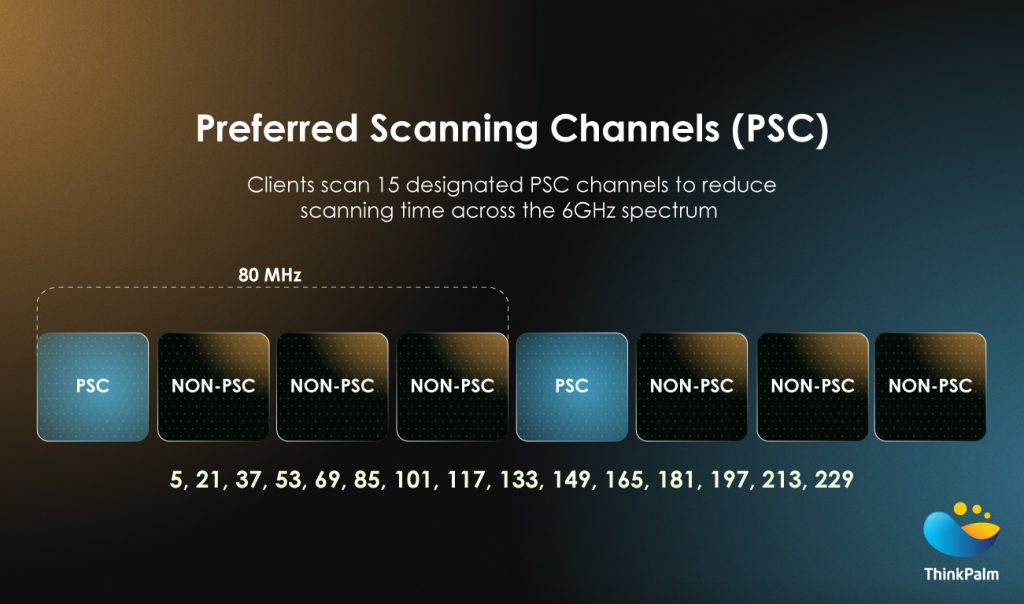
Preferred Scanning Channels Reduce 6 GHz Scan Time
Looking to optimize Wi-Fi performance in your enterprise environment? Explore how AI Networking is transforming Wi-Fi performance in enterprise networks.
Another important enhancement is Fast Initial Link Setup (FILS).
Traditionally, Access Points send beacon frames every 100 milliseconds. If a client starts scanning just after a beacon was sent, it has to wait for the next one. While waiting, it often sends repeated probe requests to fill the gap. In dense environments with many devices doing the same thing, this adds up to a lot of unnecessary airtime usage.
FILS addresses this by introducing lightweight discovery frames transmitted approximately every 20 milliseconds between beacon intervals. These small frames carry just enough essential information for a client to make a decision, including:
With this approach, a client can quickly detect nearby networks, decide if they are relevant, and pause active probing until the next full beacon arrives. This reduces unnecessary traffic and speeds up the connection process considerably.
FILS enables faster discovery, reduces probe overhead, improves airtime efficiency, and enhances overall Wi-Fi performance. This is especially valuable in high density deployments like offices, airports, and stadiums.
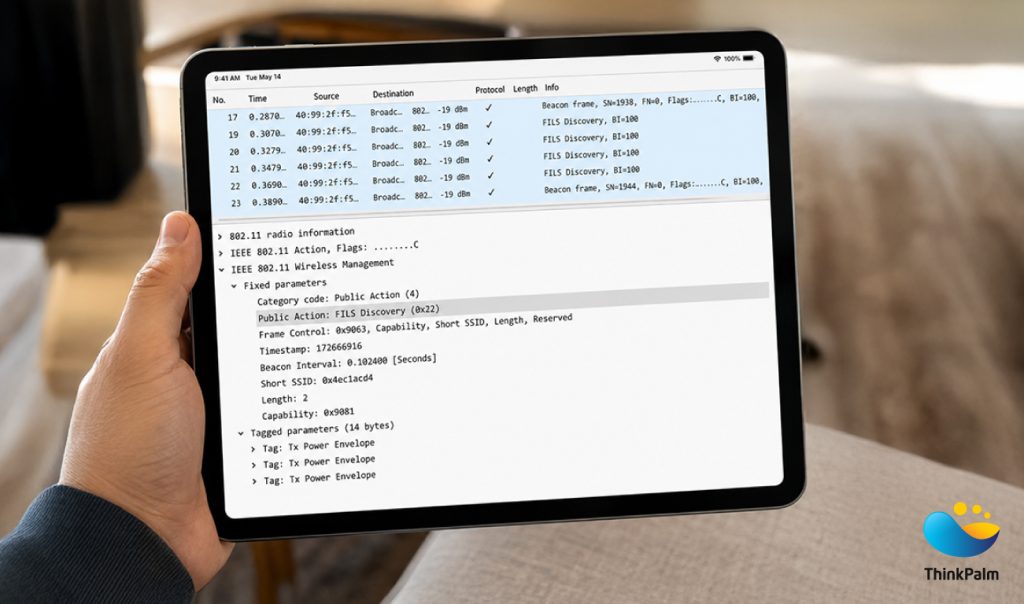
FILS Discovery Frames Accelerate 6 GHz Network Discovery
Traditionally, probe responses are sent only after a client sends a probe request. The client always has to make the first move.
In 6 GHz, APs flip this around entirely. They can proactively broadcast probe responses without waiting for a request. These are known as Unsolicited Probe Responses (UPR).
Think of it like a shop that puts its best offers on a board outside. You know what is available before you even walk in or ask anyone inside.
This further reduces the need for active probing and allows clients to discover APs passively and efficiently. It is another example of how 6 GHz moves away from brute-force discovery toward smarter and more intelligent signalling.
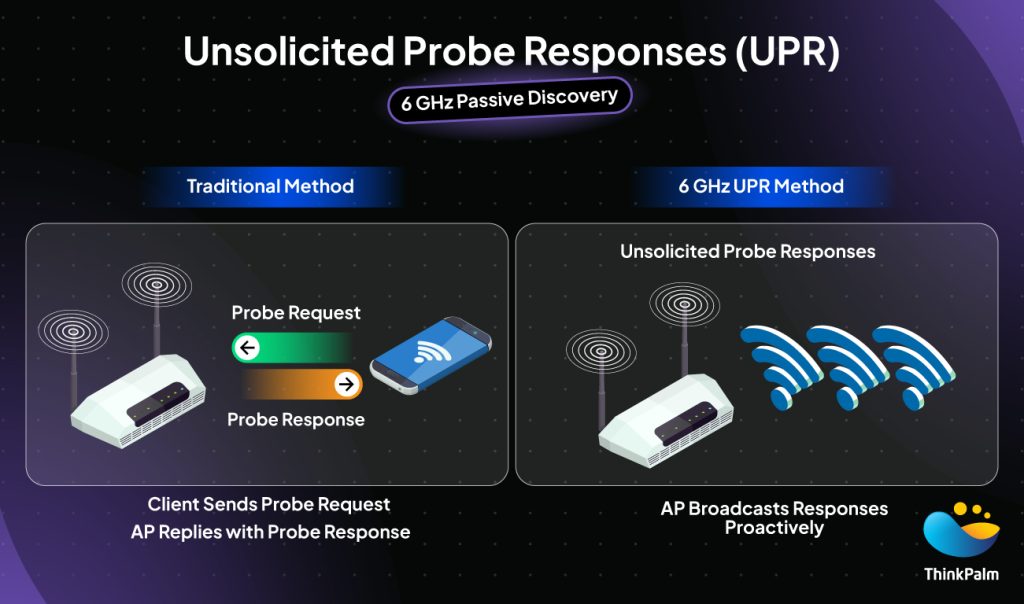
6 GHz UPR enables faster, proactive Wi-Fi discovery
Each discovery mechanism we have covered so far solves a specific piece of the puzzle. But the real power of 6 GHz WiFi discovery comes from how they all work together as a system.
Think of it like a toolbox. Each tool serves a specific purpose, and the right one is picked based on what the situation calls for. The choice of discovery method depends on what information is available and what features both the AP and the client device support.
For example:
Together, these four mechanisms represent some of the most important WiFi optimization techniques introduced in recent years. They ensure that even with a massive increase in available spectrum, connection time, and roaming performance stay fast and reliable.
This layered approach is also a big part of what makes Wi-Fi 7 networks perform better than their predecessors in real-world deployments. The smarter the discovery process, the faster and more seamless the overall experience.
Want to see smarter Wi-Fi connectivity in action? Learn how ThinkPalm approached Wi-Fi Easy Connect Implementation in RDK-B.
| Mechanism | Type | Primary Benefit |
| Reduced Neighbor Report (RNR) | Out-of-Band | Directs client to exact 6 GHz channel via legacy band beacon |
| Preferred Scanning Channels (PSC) | In-Band | Reduces scan scope from 59 channels to just 15 |
| Fast Initial Link Setup (FILS) | In-Band | Speeds up detection with lightweight frames every 20 ms |
| Unsolicited Probe Responses (UPR) | In-Band | Eliminates need for active probing entirely |
Understanding how 6 GHz AP discovery works is one thing. Knowing how to design your network around it is another.
For network engineers planning Wi-Fi 6E and Wi-Fi 7 deployments, these discovery mechanisms are not just background knowledge. They directly influence how you design, configure, and optimize your wireless network.
Here are the key considerations to keep in mind:
Getting these details right at the design stage saves a lot of troubleshooting later. Smarter discovery means faster connections, better roaming, and a more reliable experience for every device on your network.
Understanding these discovery mechanisms is the first step. Implementing them correctly in a real network is where the details truly matter.
At ThinkPalm, our engineering teams work closely with Wi-Fi 6E and Wi-Fi 7 network design and deployment across a wide range of environments. From enterprise campuses to high density public spaces, we help organizations move beyond theoretical knowledge and build wireless networks that are fast, reliable, and ready for the demands of modern connectivity.
Whether it is ensuring RNR is correctly configured across multi-radio APs, planning deployments around Preferred Scanning Channels, or validating that discovery performance meets real world expectations, our teams bring hands-on experience to every layer of the process.
As the wireless landscape continues to evolve with Wi-Fi 6E and Wi-Fi 7, having the right engineering partner makes a significant difference. The protocols are smarter. The deployments need to be too.
Looking to validate your Wi-Fi 6E or Wi-Fi 7 network performance in real-world conditions? Explore ThinkPalm’s Wireless Testing Services to discover how we help engineering teams build, optimize, and verify high-performance wireless networks with confidence.
The move to 6 GHz was never just about adding more spectrum. It was about rethinking how wireless networks operate from the ground up.
6 GHz WiFi discovery is a perfect example of that rethink. Instead of asking clients to search harder, the Wi-Fi ecosystem built smarter tools to guide them. RNR points clients directly to the right channel. PSC narrows the search space. FILS speeds up detection. UPR removes the need for active probing altogether.
Each mechanism solves a specific problem. Together they make 6 GHz fast, efficient, and practical for real world deployments.
As wireless networks continue to evolve, it is worth remembering that the biggest improvements do not always come from raw speed or new hardware. Sometimes the most important innovation is something as fundamental as how a device simply finds its network.
And in 6 GHz, that simple act became an engineering achievement in itself.
6 GHz WiFi discovery is the process of finding and connecting to an Access Point in the 6 GHz band. Because the band has 59 possible channels, smarter mechanisms like RNR, PSC, FILS, and UPR replaced traditional scanning to make discovery faster and more efficient.
Access points operate on 15 designated Preferred Scanning Channels in the 6 GHz band to simplify network discovery. Instead of scanning all 59 channels, a Wi-Fi 6E client only checks these 15, making discovery significantly faster.
FILS sends lightweight discovery frames every 20 milliseconds instead of waiting for a full beacon every 100 milliseconds. This speeds up AP detection, reduces unnecessary probe requests, and improves airtime efficiency especially in high density environments.
The Reduced Neighbor Report is an element inside a 2.4 GHz or 5 GHz beacon that tells a client the exact channel and BSSID of a co-located 6 GHz AP. This allows the client to tune directly to the right channel without scanning the entire 6 GHz band.
Both use the same core discovery mechanisms. However, Wi-Fi 7 adds multi-link operation which allows devices to connect across multiple bands simultaneously, making discovery faster and band switching more seamless than Wi-Fi 6E.
Enable the 6 GHz radio in your router settings and ensure that both your router and device support Wi-Fi 6E or Wi-Fi 7. Keeping your router firmware updated and staying within range of the router ensures the best discovery experience.
Nikhila M T is a Software Architect at ThinkPalm Technologies. With 12 years of experience in the Datacom Domain. She is always passionate about learning new technologies. Her hobbies are drawing and cooking.