AI-Assisted Frontend Development: Using Cursor AI for Angular Applications
Artificial Intelligence
 Kavya Sebastian
October 23, 2026
Kavya Sebastian
October 23, 2026



 Kavya Sebastian
October 23, 2026
Kavya Sebastian
October 23, 2026
Frontend work is rarely just writing components. As Angular applications grow, developers spend much of their time reading unfamiliar code, chasing bugs, refactoring old components and writing repetitive unit tests. Changing one thing without breaking another can be harder than building the feature in the first place.
This is where AI-Assisted Frontend Development becomes practical. Tools like Cursor AI can explain existing implementations, help trace bugs, suggest refactors and draft tests, as long as the developer stays in charge of the result.
In this guide, we walk through how Cursor AI fits into everyday Angular work: understanding code, building features, setting guardrails with Cursor Rules, debugging, refactoring, testing, code review and validation. Each section includes prompts you can adapt to your own projects.
Cursor is an AI-native code editor built on VS Code. Because it indexes your codebase, it can answer questions about your own components, services and routes, not just generic Angular patterns. Its main building blocks are:
Ask questions about the code or let the agent plan and make multi-file changes. For the bigger picture, see our practical guide to enterprise agentic AI.
Project-level instructions that shape every response.
Connections to external tools, including the Angular CLI.
Cursor AI for Angular development works best as a collaborator inside an existing architecture. It is not a replacement for knowing Angular. The rest of this article shows how to use it that way.
One of the hardest parts of joining an unfamiliar project is understanding how its pieces fit together. A single Angular feature can involve several components, services, interfaces, shared UI elements, and API integrations.
Cursor AI can help explain how these pieces interact. Rather than immediately asking it to generate code, it is useful to start by understanding the existing implementation.
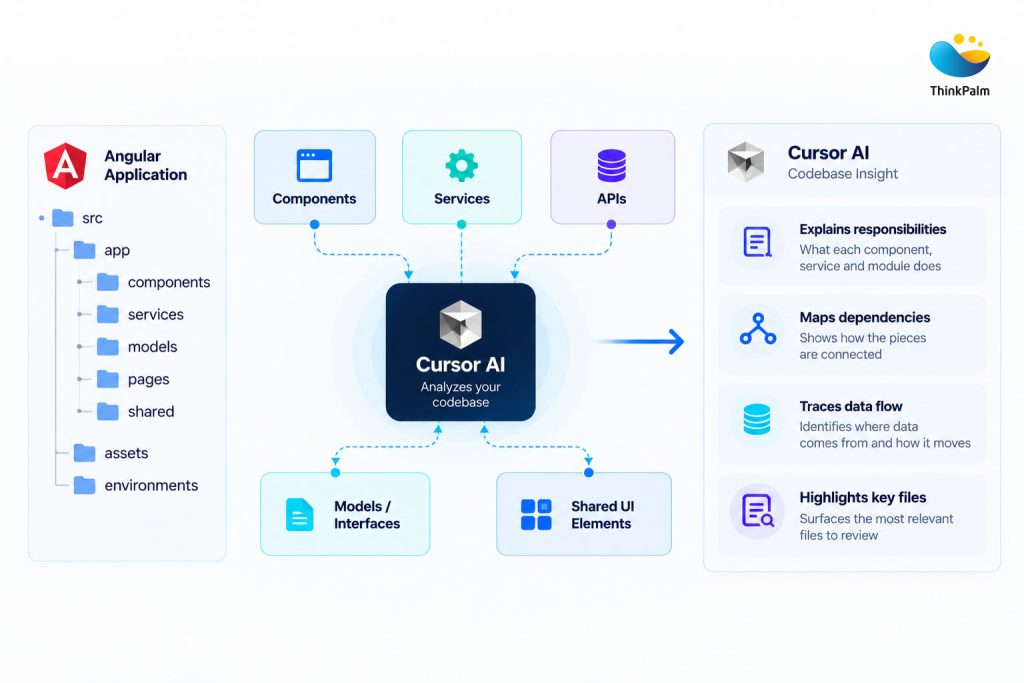
How Cursor AI analyzes codebases to map components, dependencies, and data flows.
Ask Cursor to explain the current behavior first. For example:
Prompt
Analyze this component and explain its responsibilities, API interactions, data flow, and dependencies. Do not modify any files.
The answer should tell you where data originates, how it moves between services and components, and how the UI reacts to changes. Treat it as a map you then verify against the code. This step matters most before fixing bugs or extending an existing feature.
Cursor can create components, define TypeScript interfaces, implement services, build reactive forms and wire up APIs. But a prompt like “create a user list component” often produces code that duplicates existing functionality, adds unnecessary dependencies or ignores team conventions.
A better prompt states the behavior and the project standards:
Prompt
Create this component using the existing project structure and coding conventions. Reuse shared UI components, follow current service patterns, and avoid modifying unrelated files.
These constraints help keep implementations consistent.
AI-Assisted Angular Development is most useful when AI helps implement requirements within an established architecture rather than generating a separate solution that needs extensive rework.
In larger applications, teams follow conventions for naming, folder structure, API integration, styling, state management, and testing. Without sufficient context, AI may suggest implementations that conflict with these conventions.
Cursor Rules help by providing project-specific instructions. Rules can describe preferred Angular patterns, shared component usage, error handling, testing expectations, and restrictions on modifying unrelated modules.
For example, a project rule might require API calls to remain inside services rather than being added directly to components. Another might specify that existing shared form controls should be reused instead of creating duplicate UI elements.
These instructions reduce the need to repeat requirements in every prompt. Although Cursor Rules do not guarantee perfect compliance, they help make AI-assisted development more consistent.
Debugging Angular applications with AI works best when investigation and implementation are kept separate. A UI that fails to update might trace back to an API response, an observable, a state change or a template condition. If you ask AI to “just fix it”, it will often patch a symptom and leave the root cause untouched.
Start with diagnosis:
Prompt
Analyze why the UI is not updating after the API response changes. Trace the data flow from the service to the component and template. Identify likely causes before suggesting a fix.
Once you agree with the explanation, ask for the smallest safe change. Then confirm it using browser developer tools, the network tab and runtime logs. AI can propose a cause, but only the running application proves it.
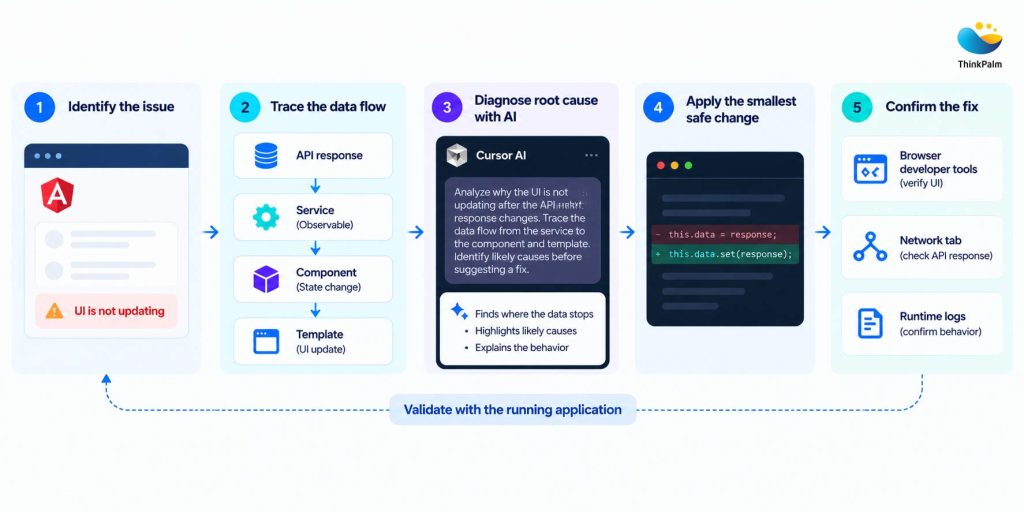
How AI integrates into the software development workflow
This approach to debugging Angular applications with AI separates investigation from implementation. Developers can check whether the explanation matches actual application behavior. Browser developer tools, network requests, and runtime logs may still be needed to confirm the issue.
Pipelines that combine switchMap, combineLatest, forkJoin and catchError are hard to read at a glance. Cursor can walk through a pipeline and answer questions such as:
This is useful for tracking down duplicate API calls, unexpected data updates or subscriptions that outlive their components. Always check the explanation against the real code, because RxJS behavior depends on the exact operators and subscription structure.
Refactoring is often riskier than building something new. Older components accumulate business logic, workarounds, and hidden dependencies, so even a small change can have side effects. That makes Legacy Angular Codebase Refactoring a strong use case for AI, provided it is approached carefully.
Begin with a review, not a rewrite:
Prompt
Review this component for refactoring opportunities. Identify duplicated logic, complex methods, and responsibilities that could be separated. Explain the potential benefits and risks without changing the code.
Then apply improvements in small, reviewable steps.
AI can also help evaluate Angular Signals and Standalone Components for older applications. Signals can simplify local reactive state, and standalone components reduce the boilerplate of NgModules. Still, modernization should solve a real problem, and your Angular version, current architecture, and delivery timeline should drive the decision.
A full rewrite is the riskiest way to modernize. ThinkPalm moves your legacy Angular components to Signals and standalone components in phases, with AI-assisted engineering and testing at every step, so your live application keeps running.
Explore Our Modernization Services →Writing unit tests is essential for maintaining reliable applications, but creating tests for every component and service can be repetitive.
Cursor can generate initial tests based on existing implementations. Service tests might cover successful API responses, failed requests, and empty results. Component tests might cover form validation, conditional rendering, and user interactions.
A useful prompt is:
Prompt
Generate Angular unit tests for this component using the project’s existing testing framework. Cover normal behavior, error scenarios, and relevant edge cases. Follow existing mocking patterns and do not modify production code.
This saves time when setting up repetitive test structures.
However, generated tests need to be reviewed. A test may pass without verifying meaningful behavior or may overlook an important edge case. Tests should reflect actual requirements and fail when expected behavior is broken.
AI can accelerate test creation, but thoughtful test design remains essential.
Want to see AI applied across the whole delivery lifecycle? Our blog on an AI-first SDLC in a payroll software project shows how AI-driven coding and testing can fit into real product delivery.
Code review looks beyond whether a feature works. It also looks for bugs, maintainability issues, and inconsistencies. AI code review for frontend development adds a useful first pass before your peers see the pull request. Cursor can flag TypeScript issues, missing error handling, duplicated logic, unnecessary API calls, accessibility gaps and deviations from project conventions.
Prompt
Review these changes as a senior Angular developer. Identify potential bugs, maintainability issues, and deviations from existing project patterns. Prioritize findings by severity and explain your reasoning. Do not rewrite the code.
Go through the findings one by one instead of auto-applying fixes. Some point to genuine problems, while others only reflect a different style preference. AI review should complement human review, since business requirements and architectural decisions still need developer judgment.
AI-generated code should be reviewed and tested like any other code. It can look correct while hiding wrong types, incomplete error handling, or assumptions that do not match your requirements. That is why AI-Generated Code Validation is the step that separates AI-Assisted Frontend Development that ships safely from the kind that creates rework.
Before accepting a change, run through this checklist:
A practical workflow is to generate the implementation, inspect the changes, run the relevant checks, and refine the code based on the results. AI can speed up implementation, but verification remains the developer’s responsibility.
Cursor can help identify potential performance issues in Angular applications. A component might make unnecessary API calls, perform expensive calculations during rendering, maintain redundant state, or update more frequently than required.
Developers can ask Cursor to analyze these areas:
Prompt
Analyze this component for potential performance issues. Consider API calls, subscriptions, change detection, list rendering, and expensive template expressions. Explain the likely impact before suggesting changes.
These suggestions provide a starting point for further investigation. However, browser profiling, network inspection, and application measurements should guide optimization decisions. This avoids adding complexity without delivering meaningful improvements.
The quality of AI-powered development depends heavily on how clearly you describe the task. A vague prompt forces the model to guess, and those guesses rarely match your codebase. A reliable prompt answers four questions:
Which component, service or feature is involved? In Cursor, attach the exact files with @-mentions.
What is broken or missing, and what should the correct behavior look like?
What must stay unchanged, such as API payloads, public inputs and outputs, shared components or unrelated modules?
Should the AI analyze first or implement, and which checks should it run afterwards?
Here is the difference in practice.
Weak prompt
Fix the form.
Strong prompt
Fix the validation issue in @checkout-form.component.ts, where the postcode field accepts an empty value after the user clears it. Preserve the existing API payload and user interactions. Follow the shared form-control patterns and avoid changing unrelated components. First identify the root cause, then implement the smallest safe fix.
For complex work, split the task into three separate prompts instead of one large request:
Explain why this validation fails. Do not modify any files.
Apply the smallest fix you identified, touching only the files you named.
Run the unit tests and linting for the changed files, then list any behavior this change could affect.
Each stage gives you a chance to catch a wrong assumption early. Once a prompt works well for your team, turn its constraints into a Cursor Rule, so nobody has to retype them.
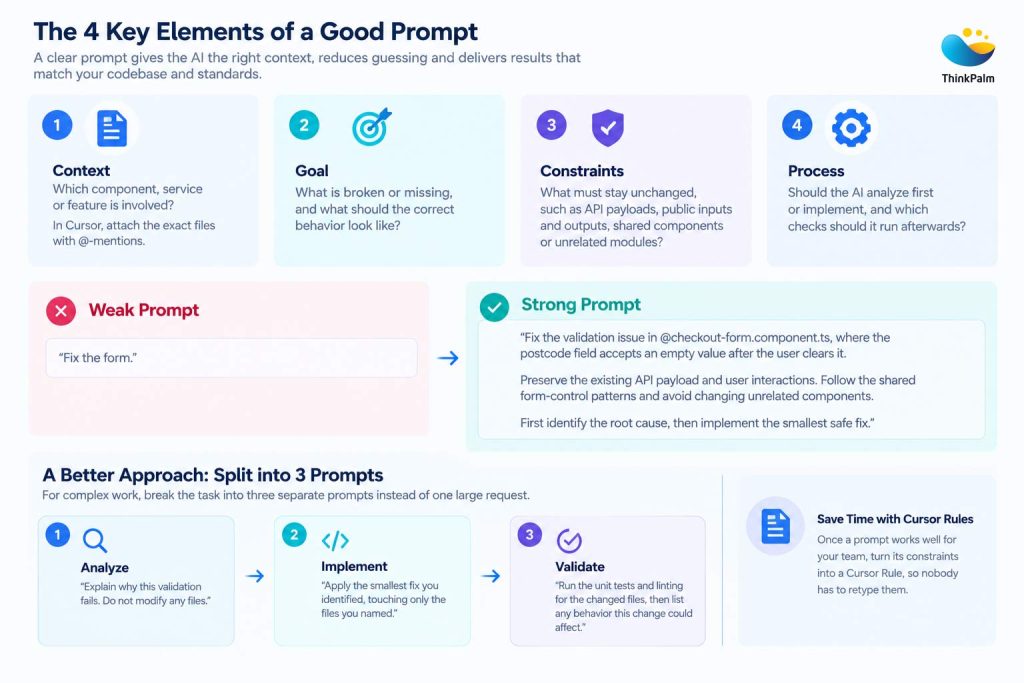
A visual representation to writing better prompts for AI-assisted coding.
AI tools fail in predictable ways, so each risk below comes with a practical way to manage it.
| Risk | What Goes Wrong | Mitigation |
|---|---|---|
| Overtrust | Polished output is easy to accept without a close read, and subtle bugs slip through. | Review every diff and run AI-Generated Code Validation checks (types, linting, tests) before merging. |
| Outdated patterns | Models often default to older Angular syntax such as NgModules, *ngIf or constructor injection. | State your Angular version and conventions in your Cursor Rules. |
| Inconsistency | Without shared rules, different developers get differently styled code. | Commit your .cursor/rules files to the repository so the whole team works from the same guidance. |
| Context overload | Long chats and verbose test logs can degrade answers. | Start a fresh chat for each new task and keep prompts scoped to the relevant files. |
| Loss of ownership | Shipping code nobody understands creates maintenance debt. | Merge only what you can explain, and ask the AI to walk you through anything unfamiliar. |
| Sensitive data | Prompts can expose credentials or customer information. | Never paste secrets or personal data and follow your organization’s policy on AI tools. |
None of these risks are a reason to avoid AI. Each is manageable with clear rules, small, scoped tasks, and consistent review.
Adopting AI-Assisted Frontend Development works best when it is built into your engineering process, not bolted on. Teams commonly struggle with inconsistent AI output, missing project rules, risky legacy components, and no standard for reviewing AI-generated code.
ThinkPalm helps close those gaps by combining Angular engineering experience with AI-driven delivery practices:
Accelerating SaaS development with ThinkPalm.
Read Case Study →Cursor AI has practical uses across Angular development: understanding unfamiliar code, implementing features, debugging, refactoring legacy components, generating tests and reviewing changes. The real value of AI-Assisted Frontend Development is not writing more code faster. It is reducing repetitive work and making it easier to investigate problems and explore solutions.
It works best when the AI has enough context, clear Cursor Rules and a human reviewing every result. Developers remain responsible for correctness, maintainability, and real-world behavior. Pairing AI tools with strong Angular knowledge and sound engineering practice is what makes them genuinely useful.
Ready to modernize your Angular application with the right AI guardrails? Talk to ThinkPalm’s engineering team about your project.
Kavya Sebastian is a Senior Software Engineer at ThinkPalm Technologies, specializing in Angular application development and modern frontend technologies. She is passionate about building scalable, user-friendly applications and exploring AI-powered tools like Cursor AI to improve development workflows, simplify debugging, and enhance code quality.