 Dhanuja R
October 27, 2026
Dhanuja R
October 27, 2026
Microservices talk to each other constantly, and most of that internal traffic is trusted far more than it should be. Any service that can reach another over the network can usually call it, and the receiving service has no way to confirm who is really calling.
So, what is mTLS? Mutual TLS (mTLS) is a form of Transport Layer Security in which both the client and the server prove their identity with digital certificates before any data is exchanged. It secures service-to-service communication by encrypting the connection and by making sure that only verified workloads can take part in it.
This is Part 1 of a three-part series. Here you will learn how mTLS differs from TLS, which microservices security challenges it addresses, where it is used, and how it supports a zero trust security model. Part 2 covers certificates and the handshake. Part 3 covers implementation in Kubernetes.
In this blog, we will cover:
Definition
mTLS, or mutual TLS, is an extension of the Transport Layer Security (TLS) protocol in which both the client and the server authenticate each other using X.509 digital certificates. Once both identities are verified, the two sides establish an encrypted connection. mTLS is widely used for service-to-service communication in microservices and zero trust environments.
The word “mutual” is the key. In standard TLS, only the server proves who it is. On the other hand, in mTLS, the server also asks the client for a certificate and checks it against a trusted certificate authority (CA). In a microservices setup, the client is usually another service, not a person with a browser.
mTLS delivers three things at once:
Data in transit cannot be read or changed by anyone on the network path.
Each side knows who the other is, based on a certificate rather than an IP address or a shared secret.
The client must show it holds the private key that matches its certificate, so a copied certificate alone is not enough.
mTLS is not a separate protocol. Client authentication is already part of TLS, and mTLS simply means that the server requires it. You may also see it called two-way TLS or two-way SSL. SSL itself is deprecated, and current deployments use TLS 1.2 or TLS 1.3.
To see what mTLS adds, start with what standard TLS already does. When a browser opens an HTTPS site, the connection follows these steps:
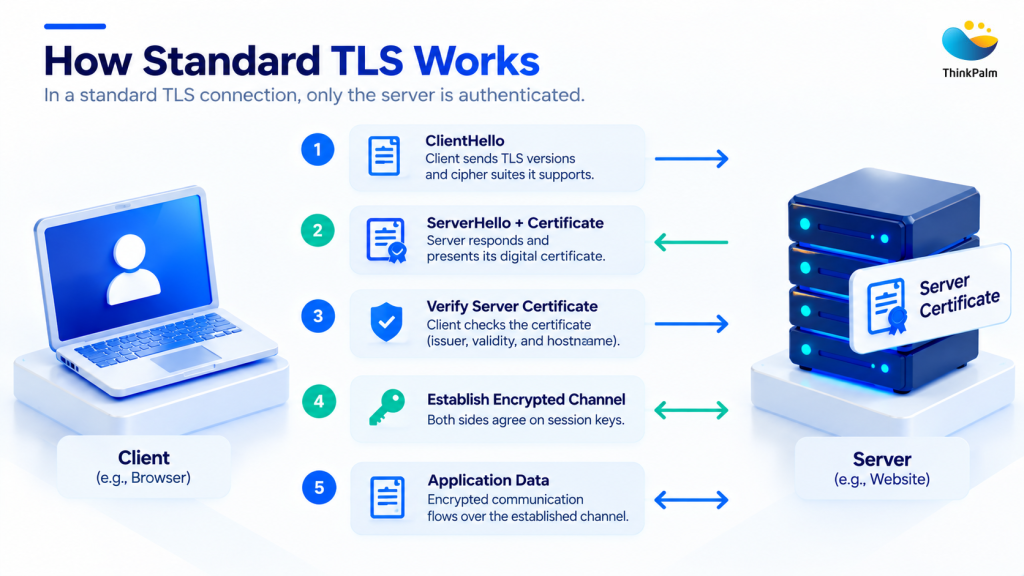
The standard TLS handshake establishes an encrypted connection by verifying the server’s identity.
This one-way model works well for public websites. A site may serve millions of visitors, and it is not practical to issue a certificate to each of them. Users prove who they are at the application layer instead, with a password or multi-factor authentication.
Cloud-native applications work very differently from public websites. In a Kubernetes cluster, the callers are not people with browsers. They are machines: hundreds of services exchanging application data, metrics, logs, configuration, and business transactions all day. There is no login screen and no human to type a password, so verifying only the server is not enough.
Inside a cluster, the same one-way model leaves a gap. The server never verifies the client with a certificate, so any workload that can reach the service can open an encrypted connection to it. The traffic is private, but the caller is unknown.
Take a Kubernetes observability platform where Grafana, Prometheus, Alertmanager, Fluentd, Loki, Vector and Cortex exchange metrics, logs and alerts all day. If only the server is authenticated, a rogue pod could:
Encryption protects the data in transit. It does not tell the server who is on the other end.
The core difference in TLS vs mTLS is who has to prove their identity. TLS authenticates the server only. mTLS authenticates both the client and the server, and both use certificates to do it. Both encrypt the traffic in the same way. TLS protects the client from spoofed or malicious servers. mTLS adds the reverse protection, because the server can also block rogue or unauthenticated clients.
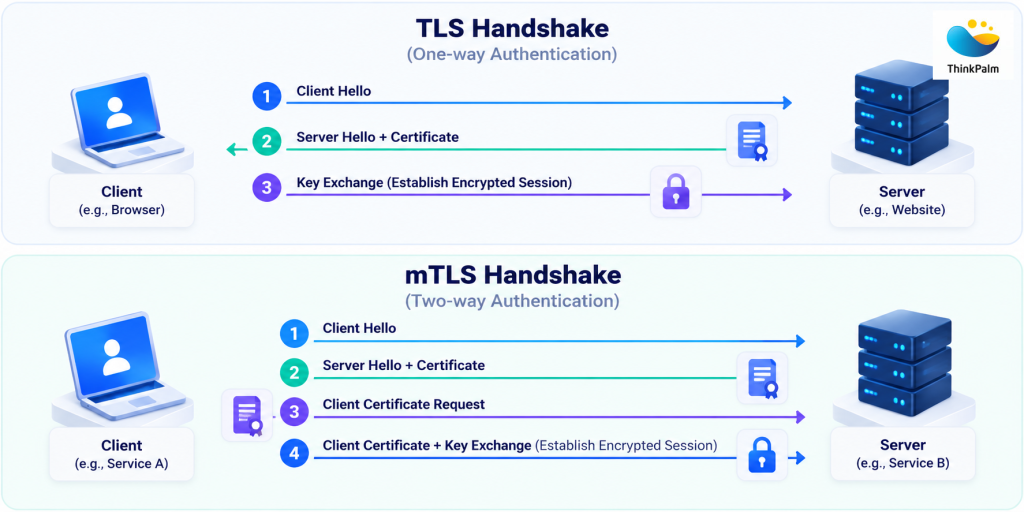
Standard TLS authenticates the server, while mTLS verifies both client and server identities.
| Aspect | TLS | mTLS |
|---|---|---|
| Who is authenticated | Server only | Client and server |
| Server identity verification | Verified using a server certificate | Verified using a server certificate |
| Certificates required | Server certificate | Server and client certificates |
| How the server identifies the client | Not by certificate; usually an application login, token or API key | By the client certificate, validated against a trusted CA |
| Encryption in transit | Yes | Yes |
| Protection against rogue clients | Limited; depends on application-layer controls | Strong; unauthenticated clients are rejected during the handshake |
| Typical trust anchor | Public CA | Often a private CA run by the organization |
| Typical use | Public websites and web apps | Microservices, internal APIs, service mesh, B2B APIs, IoT |
| Operational effort | Lower | Higher; many short-lived certificates need automated issuance and rotation, for example with cert-manager, a service mesh or SPIFFE/SPIRE |
mTLS is not a fit for public websites open to anonymous visitors, and it does not replace user authentication or authorization. It proves which workload is calling. It does not say what that workload is allowed to do.
In a monolith, components call each other inside one process, so the application boundary doubles as a security perimeter. In a microservices architecture, those same calls become network requests between many independently deployed services.
A single user request may pass through several of them, and every hop is a path that needs protecting. No natural perimeter remains. That widens the attack surface, especially in cloud-native applications built on Kubernetes. These are the main microservices security challenges that mTLS helps solve.
A malicious or compromised workload can pose as a legitimate service to receive data meant for another service or to send forged requests. With mTLS, the caller must present a certificate issued by a trusted CA and prove it holds the matching private key. A workload without a valid identity cannot complete the handshake.
Network location is a weak signal of trust. Compromised or misconfigured workloads may gain access to internal APIs, databases, monitoring endpoints, or other sensitive resources beyond their intended permissions. Strong authentication and authorization ensure that only authorized workloads can communicate with protected services.
Internal traffic often carries business transactions, credentials, logs, and configuration data. Without encryption, an attacker with network access can read or alter it. mTLS encrypts every connection and detects tampering in transit, and because both ends are authenticated, it also blocks man-in-the-middle (MITM) attacks.
For encryption at the network layer, see ThinkPalm’s guide to quantum-safe network encryption with MACsec.
After compromising one workload, attackers try to move on to others. When every service demands a valid client certificate and authorization policies limit who can call what, a compromised workload can reach only the services its own identity is allowed to reach. mTLS limits the damage, but it does not stop an attacker who steals both a valid certificate and its private key.
Threats also come from inside, such as compromised administrator accounts, malicious insiders, or exploited internal services. A zero trust security model assumes none of these requests is trustworthy by default and requires each one to be authenticated and authorized. mTLS gives that model a cryptographic way to verify the workload behind every request.
As a microservices environment grows, network boundaries and server-side authentication alone stop being enough. Organizations need a solution that both encrypts communication and verifies the identity of every participating service. mTLS does both. With it in place, mTLS reduces the risk of:
Most mTLS use cases share one trait: the client is a machine, and the server needs strong proof of who is calling. Typical examples include:
Our DevOps engineers build CI/CD pipelines, multi-cloud deployments and monitoring for cloud-native products, so security controls can be part of every release.
Read a Real Story on How We Approach It →The zero trust security model rests on one principle: never trust, always verify. Every request must be authenticated and authorized, whether it comes from outside the network or from inside it. NIST describes this approach in its Zero Trust Architecture guidance.
mTLS puts that principle into practice for service-to-service communication. Each workload gets its own certificate, so identity travels with the workload instead of depending on IP addresses, which change constantly in dynamic environments such as Kubernetes. Every connection is verified during the handshake, encrypted, and can be logged against a named identity for audit.
mTLS covers authentication and encryption between workloads. Zero trust also needs authorization, so pair mTLS with policies such as Kubernetes RBAC, network policies or service mesh authorization rules. Use OAuth 2.0 or JWT where you need end-user context.
So, what is mTLS? Simply, a version of TLS in which both client and server authenticate each other with X.509 certificates before exchanging data.
The difference between TLS vs mTLS is client authentication. Both encrypt traffic, but only mTLS verifies who is calling.
Microservices security challenges such as service impersonation, unauthorized access, and lateral movement come from having no natural perimeter. mTLS addresses them with verified identity on every connection.
Common mTLS use cases include microservices, internal and partner APIs, Kubernetes workloads, databases, and IoT devices.
mTLS supports a zero trust security model, but it needs authorization policies alongside it, and it does not replace user authentication.
Which of your services still trust the network by default?
Let’s look at it together and work out how to secure service-to-service communication in your environment.
Dhanuja R is a Software Engineer at ThinkPalm Technologies with a keen interest in networking, DevOps, and cloud technologies. She is focused on building her expertise in Linux, Kubernetes, OpenShift, and CI/CD tools. Passionate about technology and continuous learning, Dhanuja enjoys exploring emerging tools, solving technical challenges, and developing her skills in the ever-evolving field of software engineering.
One message is all it takes to get started. Tell us what you need, and we’ll take it from there, no long forms, no waiting around.

