 Chandni Nadarajan
October 15, 2026
Chandni Nadarajan
October 15, 2026
Consider the scenario where it is 2 am in the morning and an urgent ticket is raised. It sits for a few hours because the person responsible for it is unaware of its urgency. This is the exact gap an AI-powered support triage platform is built to close.
It reads, classifies, prioritizes, and routes incoming tickets as they arrive. It can also identify duplicate or related issues and flag high-risk cases for immediate attention. This allows the workflow to operate continuously, regardless of when a ticket is raised.
Definition
An AI-powered support triage platform is a system that automatically reads, classifies, and routes incoming support tickets, assigning urgency, checking for security risk, matching known issues, and drafting a resolution before a human ever opens the ticket. Instead of one agent guessing priority, AI agents for customer support work as a team giving every ticket the same structured review, every time.
This is particularly useful for leaders in support and engineering, as it retains consistency whenever support tickets arrive. Manual triage doesn’t fall short due to a lack of skill among teams. It fails because sorting, judging, and routing hundreds of tickets a week by hand simply doesn’t scale. Let us dive into the details of it.
Most support desks still sort through tickets by hand. That might work when you’re small, but as ticket volume climbs, things start falling apart in very predictable ways:
These aren’t really issues with people; they’re more about the structure itself. And that’s where an AI-driven support triage platform comes into play, ready to tackle these challenges head-on.
Wondering why traditional rule-based automation keeps falling short? Today’s support queues require intelligent, context-aware routing, not just static scripts. Explore our enterprise blueprint on AI for Business Process Automation to learn how to build workflows that scale.
An AI Triage Platform is a form of customer support automation that works by using artificial intelligence to collect raw data, analyze tickets, and assign tasks to agents. Instead of relying on a single AI to figure out everything out, the platform uses AI agents for customer support that work like a well-run team. A main “manager” agent takes in the ticket and assigns it to four specialized agents, each focused on a specific detail:
| Agent | What It Checks |
|---|---|
| Urgency and Ownership | How urgent is this and whose queue does it belong in? |
| Technical Root Cause | Assesses what causes the issue, technically. |
| Security Exposure | Analyses whether the issue involves sensitive data or security risks. |
| Knowledge Base Match | Checks whether the exact same issue was previously fixed. |
This is what AI support automation looks like in practice. But the platform doesn’t just stop at a recommendation, it carries the work forward in the following ways:
Check out the full case study to see how ThinkPalm built this multi-agent system to clear routing bottlenecks and speed up resolutions.
This is an issue often worrying enterprise leaders as they feel that adopting AI would mean giving up operational control. Here, AI helps in relieving teams from the tedious groundwork so that they can make better decisions faster. Implementing agentic AI for enterprise systems with human guardrails, ensures every high-risk decision remains fully transparent, auditable, and subject to expert approval.
To keep your systems safe and compliant, the platform operates under two non-negotiable guardrails:
The moment a ticket touches sensitive data, user permissions, or system access, the AI steps back. It doesn’t attempt to resolve it automatically; it immediately flags and routes the issue to a designated security specialist.
The AI can diagnose the bug, locate the line of code, and run initial diagnostic tests, but it will never push a change to production on its own. Every single fix needs an actual engineer to review it, sign off on it, and give the final thumbs-up.
An AI support triage platform uses contextual knowledge to figure out the actual issue and the underlying causes behind it. It has the capability of handling each request based on urgency and within its limits. Governance and audit requirements are always kept in check.
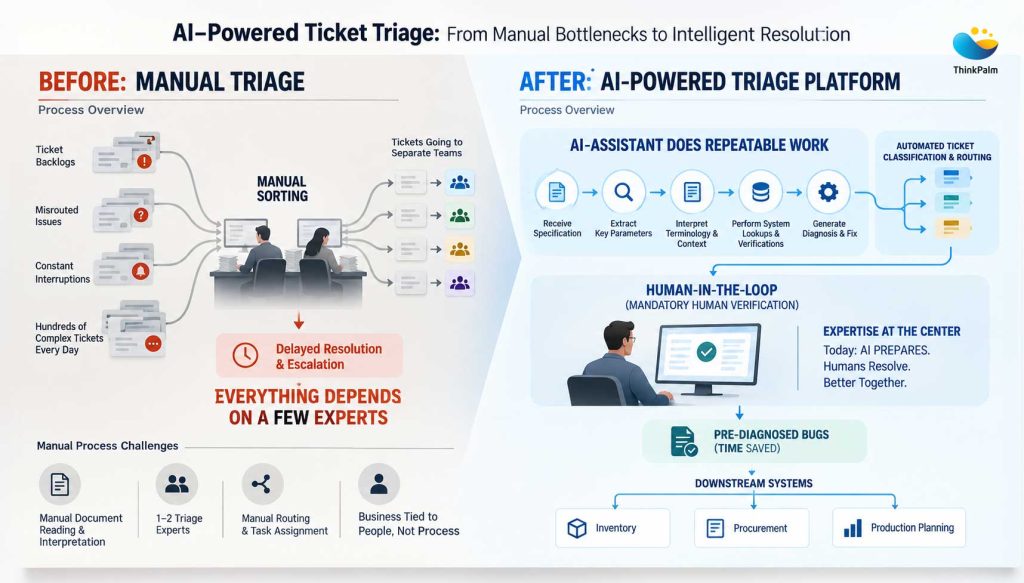
A comparison of manual triage and AI-powered ticket triage platform
| Before (Manual Triage) | After (AI Support Triage) |
|---|---|
| Varies by who’s on shift | Same structured review on every ticket |
| Judged case-by-case, may be missed | Escalated to a human, 100% of the time |
| Written description, investigation restarts | Diagnosis with evidence attached |
| Often investigated separately | Matched against existing knowledge base |
| One-time fix, no reuse | Fed back into the knowledge base for next time |
| Can happen as unreviewed manual edits | Drafted, automatically checked, then human-approved |
| Key Statistics | What It Means | Research Source |
|---|---|---|
| 66% of service organizations now use agentic AI, up from 39% in 2025 — a 1.7× increase in just one year | AI agents are becoming mainstream in customer service. | Salesforce State of Service, 2026 |
| Only 10% of customer service teams have reached mature AI deployment; 87% of mature teams report improved metrics, versus 62% of AI users overall | The AI maturity gap is widening — implementation maturity matters as much as adoption. | Intercom Customer Service Transformation Report, 2026 |
| 74% of consumers now expect customer service to be available 24/7 because of AI, while 88% expect faster response times than a year ago | 24/7 support is becoming the baseline expectation, raising the cost of delayed triage. | Zendesk CX Trends, 2026 |
| 98% of high-AI-maturity organizations have implemented or plan to implement AI reasoning controls, compared with 40% of low-maturity organizations | Governance and explainability are becoming a differentiator, not an afterthought. | Zendesk 2026 CX Research |
An AI-powered triage platform is most beneficial in the case of high-volume operation, and it’s a clear example of enterprise AI automation in action. Some of the use cases are listed below:
Useful in situations where you want to stop sorting tickets by hand and make sure every request gets routed to the right place, 24/7.
Ideal if you want bugs identified before they hit your devs’ desks, so they don’t have to start troubleshooting from scratch.
Crucial if you want to use advanced AI, but need complete control, total visibility, and zero unauthorized code updates.
Essential if you need hard, automated proof, not just rules on paper, that sensitive issues are handed over to humans every single time.
This framework isn’t limited to IT help desks. Any high-volume intake workflow that requires smart routing and human approval, from insurance claims and procurement to compliance reviews—can run on this exact same model.
In most support operations, the bottleneck was never lacking skill. Instead, it’s the time-consuming process of sorting tickets manually, where every solution feels like starting from scratch. An AI-driven support triage platform bridges this gap: the AI handles the investigation, drafting, and verification, while a human oversees the final decisions. At ThinkPalm, we help enterprises turn complex operational challenges into practical, AI-driven solutions that improve workflows, support better decisions, and keep human oversight at the center. This approach is just as effective for claims, purchasing, and compliance as it is for help desk support.
Still relying on manual ticket triage? Discover how AI-powered triage speeds resolution, reduces repetitive work, and keeps humans in control.
Chandni Nadarajan is a content writer at ThinkPalm Technologies, specializing in B2B marketing content. With a passion for turning complex ideas into clear, engaging narratives, she blends strong research and storytelling skills to make technical topics accessible. Her expertise spans technology, automation, and digital business solutions.
One message is all it takes to get started. Tell us what you need, and we’ll take it from there, no long forms, no waiting around.

