Next-Gen QA is Here: AI + Playwright MCP for Smarter Testing
Automation
 Sruthi M S
March 17, 2026
Sruthi M S
March 17, 2026



 Sruthi M S
March 17, 2026
Sruthi M S
March 17, 2026
Modern software development demands faster and more precise application testing than ever before. However, traditional test automation usually serves as a bottleneck. It requires a great deal of manual coding, a constant search for the correct web elements, and the time-consuming process of rewriting broken selectors each time the UI changes. This is where Playwright MCP is gaining strong momentum as a smarter, AI-powered alternative.
This dynamic is being transformed by the introduction of the Playwright Model Context Protocol (MCP). We no longer need to manually code all test scripts. With MCP, Playwright test automation allows you to describe testing intentions using simple natural language and demonstrate them to your browser, allowing the system to write the code and locators in real time, closing the gap between AI and the browser.
This evolution is possible by combining Playwright with the MCP standard. This constitutes a powerful force in quality assurance when combined with advanced AI assistants such as GitHub Copilot or Claude.
Here’s What We’ll Explore
In this guide, we break down what Playwright MCP is and how it connects AI directly with the browser. You’ll learn how it improves test stability, reduces maintenance effort, and enables natural language test creation. We also explore real benefits, setup steps in VS Code, and why human oversight still matters. If you’re looking to modernize QA, this blog will show you where to start.
The Model Context Protocol (MCP) is an open standard that helps AI systems talk directly to other tools and apps. While browsers are often treated as a “black box,” where tools must guess what is happening, with Playwright MCP, the guesswork is completely resolved. Instead of looking at pixels or screenshots, the AI is able to understand the real structure of the page with clarity.
MCP allows the AI to see the page with the accessibility tree. As a result, the AI knows what buttons, text fields, and links are there on the screen. This allows it to perform actions like clicking, typing, or moving to a new page. All through clear and accurate commands.
To make it simpler, you can think of MCP as a translator. When you give the AI simple natural language instructions like ‘log in and check the dashboard’, it understands your request. The rest is handled by taking care of the steps needed in the browser.
The result is a powerful setup where AI-powered test automation works smoothly with Playwright’s precise testing tools.
Here is an example workflow of MCP shown below.
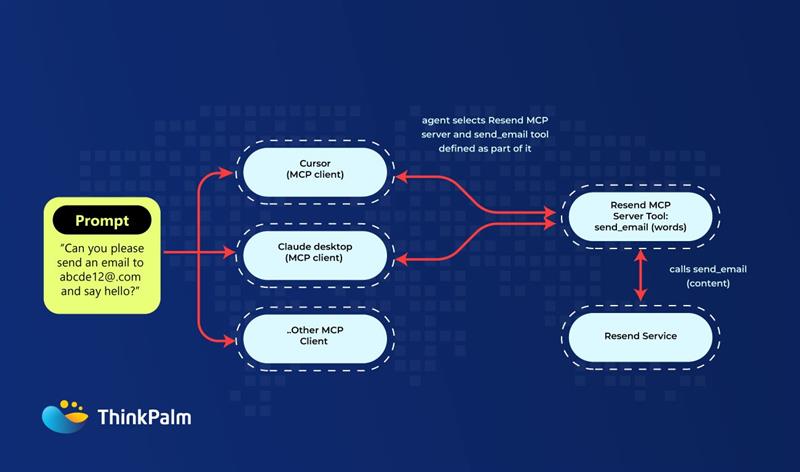
MCP workflow showing how AI agents translate prompts into executable actions.
For any AI model that works with Playwright MCP, it functions like a helpful partner in testing. It works more like a team where the AI makes smart decisions about what needs to happen, and the MCP server carries out those actions perfectly in the browser.
Think of it like this: AI gives instructions while Playwright acts as the skilled technician that performs them.
This teamwork makes Playwright AI test automation much smoother. You don’t have to write and update the code every time the app design changes. The AI can easily understand the new layout and adjust the test steps automatically. This keeps your tests useful even when the interface changes.
Additionally, the Playwright Model Context Protocol works aligned with modern AI assistants like Cursor, GitHub Copilot, and Claude. Together, they create intelligent test automation that is much faster, smarter, and more flexible than traditional Playwright test automation alone.
Using Playwright MCP together with AI gives testing teams a faster and more flexible way to work. Here are some of the biggest benefits of this AI-powered test automation approach:
There is no need to write long scripts. Anyone on the team can describe a test in simple English, like “open the settings page and check that the save button works”. The AI is capable of building the basic test for you. This helps people who aren’t experts in coding to join the testing process with ease.
Usually, app designs can change often, and this breaks old selectors. When associated with MCP, the AI can adjust to new layouts easily on its own. It can “self-heal” by identifying the correct elements even after a redesign, drastically reducing maintenance overhead. This helps reduce the time spent on fixing tests and also helps keep them running smoothly.
Traditional tests usually check only the “happy paths.” With AI-driven test automation, the AI can suggest other extra paths or unusual flows based on the app behavior. This results in deeper and more complete testing.
Another major benefit is that Playwright MCP connects well with popular CI/CD tools like GitHub Actions, Jenkins, or GitLab. Teams can easily add it to their workflow without major workflow changes, which makes it simple to use. It is thus effortless to adopt intelligent test automation step by step, without slowing down releases.
Getting started with Playwright MCP in Visual Studio Code is easier than it might look. Here’s how the setup worked for our team:
The best part was that the whole setup fits right into the tools we already use every day. There were no steep learning curves and no confusing setup steps, which made Playwright AI test automation easy to adopt.
As AI tools become easier to integrate, teams must also understand the cost estimation challenges in the AI era to plan automation and testing initiatives more effectively.
Even when we tend to highlight the power of AI-driven test automation, human testers still play a key role. This is because, while AI can create fast and helpful drafts, it always requires a tester to provide the skills and judgment needed to make the tests truly strong.
AI agents are good at creating the first version of a test in seconds. That too, using natural language test automation. However, to ensure quality, testers still need to review the code and make sure that it is correct, clear, and reliable.
It is also crucial to always check the results produced by AI. Ensure that the test is taking the right steps. Also, whether the locators are stable enough for future changes? Human intervention matters to highlight that the test is not just working but is also meaningful.
Clean up and organize the AI’s draft so it matches your team’s coding style, like using the Page Object Model (POM). This keeps your project easy to maintain as it grows.
One major thing to keep in mind is that the more teams work with AI and Playwright MCP, the better the suggestions become. This works as the AI learns from your project patterns over time and thus produces more accurate test ideas.
To make it further clear, Playwright MCP gives the AI the ability to “see” the app. Alongside, the human tester brings the strategy. While the AI provides speed, you provide insights. Together, this could result in creating high-quality, reliable tests.
Playwright is one of the strongest tools that can be used to construct scalable end-to-end tests. Playwright test automation becomes even more powerful with the inclusion of the Model Context Protocol, as teams can move past static scripting and shift toward intelligent, behavior-conscious automation.
The next thing to do is to start adding these “smart features” such as adaptive waits and AI-generated tests to your existing system. This will eventually reduce maintenance fatigue and shorten your release cycles.
If you’re looking for guidance or deeper expertise, ThinkPalm can help teams navigate the shift toward more advanced automation strategies. Whether you’re just getting started or modernizing an existing framework, the next steps remain the same. Experiment, refine, and adopt intelligent automation techniques that enhance your current workflows.
The Playwright Model Context Protocol (MCP) is an open standard that allows AI models to interact directly with the Playwright automation engine. It provides the AI with “context” by exposing the browser’s accessibility tree, enabling it to understand and control web elements using natural language.
Unlike traditional selectors that rely on specific CSS or XPath strings, Playwright MCP allows AI to identify elements based on their role and purpose using the accessibility tree. This makes tests significantly more resilient — for example, the AI can still locate a “Login” button even if its underlying code or position changes. While this greatly reduces selector breakage, highly complex or dynamic UIs may still require human intervention to maintain full test stability.
While Playwright MCP allows you to generate tests using natural language, a basic understanding of Playwright and JavaScript/TypeScript is still beneficial. Human oversight is essential for refining AI-generated scripts and ensuring they follow architectural best practices like the Page Object Model.
Yes, Playwright MCP is designed to work with modern AI tools such as GitHub Copilot, Claude (via Claude Desktop), and Cursor. It effectively turns these assistants into “agents” that can execute actions directly in your browser.
Yes, when set up correctly. Playwright MCP runs locally, so browser interactions stay within your own environment and no test data is sent to external servers by default. To keep it secure, always run it in a test environment with mock data rather than against live production systems, manage credentials through a secrets vault, and restrict network access in your CI pipeline. With these basic precautions, Playwright MCP is a safe and practical choice for enterprise testing.
Sruthi M S is a Test Lead and quality enthusiast focused on ensuring software excellence across enterprise applications. She is currently exploring AI-powered test automation with Playwright and is focused on leveraging emerging AI tools to make testing smarter, faster, and more efficient.