How SAP HANA Works: A Complete Guide to Architecture, Security, and Real-World Use Cases
Database
 Ajeeth K
February 25, 2026
Ajeeth K
February 25, 2026



 Ajeeth K
February 25, 2026
Ajeeth K
February 25, 2026
Have you ever wondered how quickly a food-delivery app functions?
You place an order in your favorite app, the restaurant gets an update, the respective delivery partner is assigned, and your tracking map starts showing the status whether food is being prepared, packed, or already on its way. All these activities happen in no time.
This seamless experience is possible because information is processed within seconds, enabling multiple actions to happen simultaneously behind the scenes. One of the technologies that make this possible is SAP HANA.
Blog in a nutshell
This blog explains what SAP HANA is, how it works, covering its architecture, security and encryption mechanisms, key management with SSFS and LSS, and real-world use cases. It also highlights how SAP HANA supports modern platforms like SAP S/4HANA and enables AI-driven analytics.
SAP HANA is an in-memory, column-oriented database platform developed by SAP that enables real-time analytics and transaction processing on a single system.
Traditional databases store data on hard disks. However, this takes more time to read. But SAP HANA keeps data in main memory. This allows data to be processed quickly just like how apps run faster when they are already open on your phone.
They equip businesses to:
Furthermore, many businesses use SAP HANA to run their important applications, manage large datasets, and gain real-time business visibility.
As speed happens to be a deciding factor in today’s data-driven world, SAP HANA emerges as a database for faster reporting, handling both transactional and analytical workloads in real time. Here are some key distinguishing features of SAP HANA from other databases.
Data security is a top priority for modern enterprises. As companies need to deal with enormous amounts of data, safeguarding crucial information should be done with precision. SAP HANA security ensures that different layers of encryption are followed so that only authorized people can read information.
There are different methods to secure data when it is being sent, stored or utilized. Moreover, there are specific locations for storing the keys. Secure Store in File System (SSFS) and Local Secure Store (LSS) used for unlocking encrypted data.
In short, we can say that SAP HANA security supports encryption at multiple levels to safeguard data throughout the lifecycle.
Now we shall see how SAP HANA keeps data safe at each of the stages-both client level and server-side encryption.
This sort of encryption protects data while it is being sent from the user’s device to the SAP HANA server.
This is to protect the data that is stored inside the SAP database and the communication happening within it.
SAP HANA uses Keystores to store important data securely as encryption keys or certificates. They function as “special locks and passwords” that protect the database. Two important SAP HANA Key Management are SSFS and LSS.
SSFS is the old, default keystore used in SAP HANA. They store important credentials and encryption keys safely.
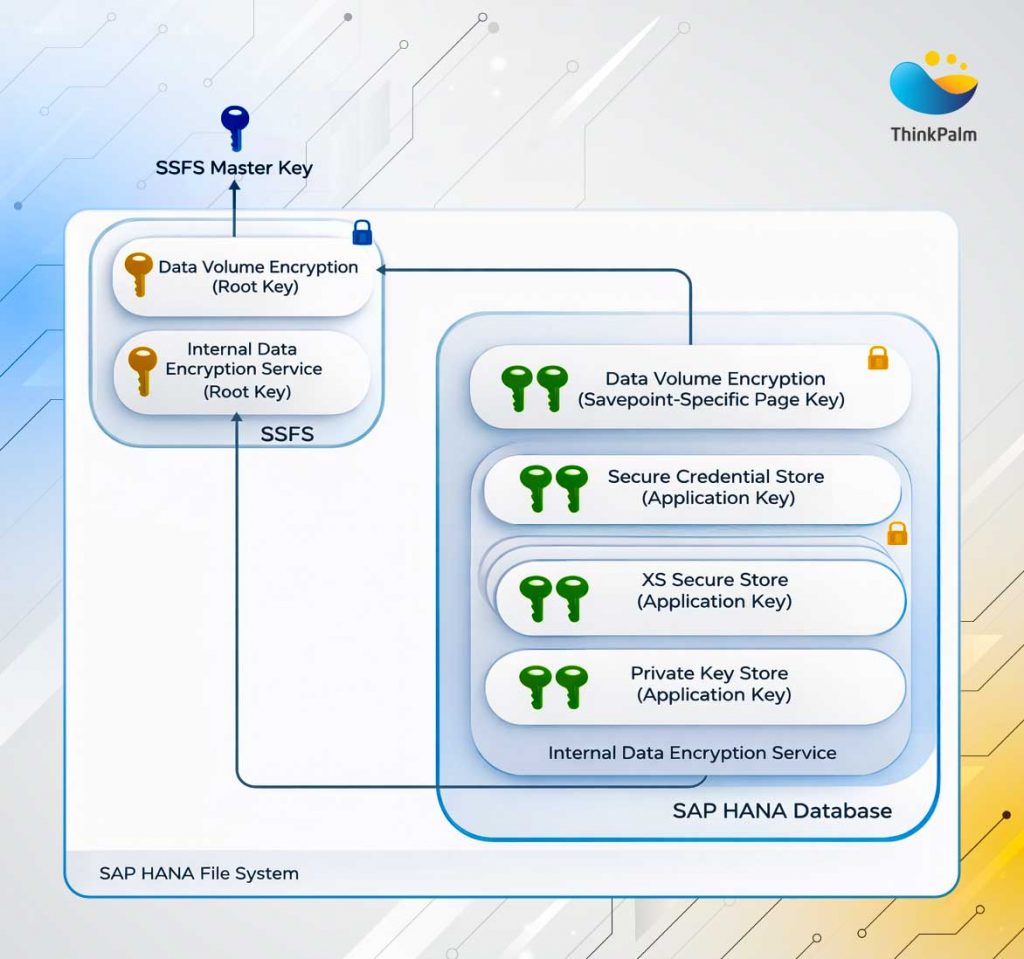
SAP HANA SSFS key store diagram showing secure encryption key management
These files are in a secure folder:
/usr/sap/<SID>/HDB<instance>/sec/
If these files are lost or damaged, some encrypted data may not be readable anymore. So, they must be backed up safely.
LSS is an improvised, next generation keystore system designed by SAP for modern security needs. Also, it offers stronger protection, better lifecycle management, and compliance readiness for enterprises.
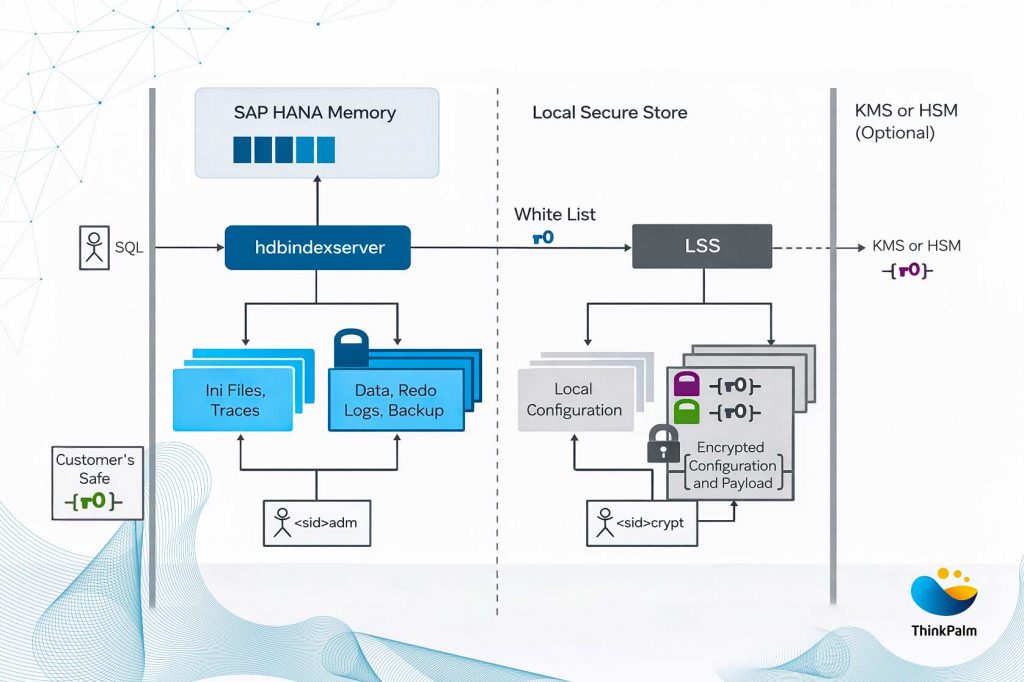
SAP HANA Local Secure Store (LSS) key management architecture.
Now that we know about SAP HANA key management, it’s equally important for us to explore its architecture, i.e. how the system itself is organized. Here’s a closer look at SAP HANA’s architecture.
Talking of SAP HANA Architecture will help you understand the happenings inside, how it is built and the different parts that work together. However, it has many servers and services that run in the background.
The most important part of SAP HANA is the Index Server, often regarded as the heart of the HANA system. They execute SQL/MDX statements using engines in the Index server. Additionally, it also has session and transaction manager to undertake important tasks, see the status of tasks whether complete or running.
Persistence Layer in the Index server is used for backing up data and transaction of log files. This ensures that all your data is saved safely. Therefore, this capability takes care of SAP HANA security, making it more trustworthy.
Read how containerization simplifies modern application deployment and testing.
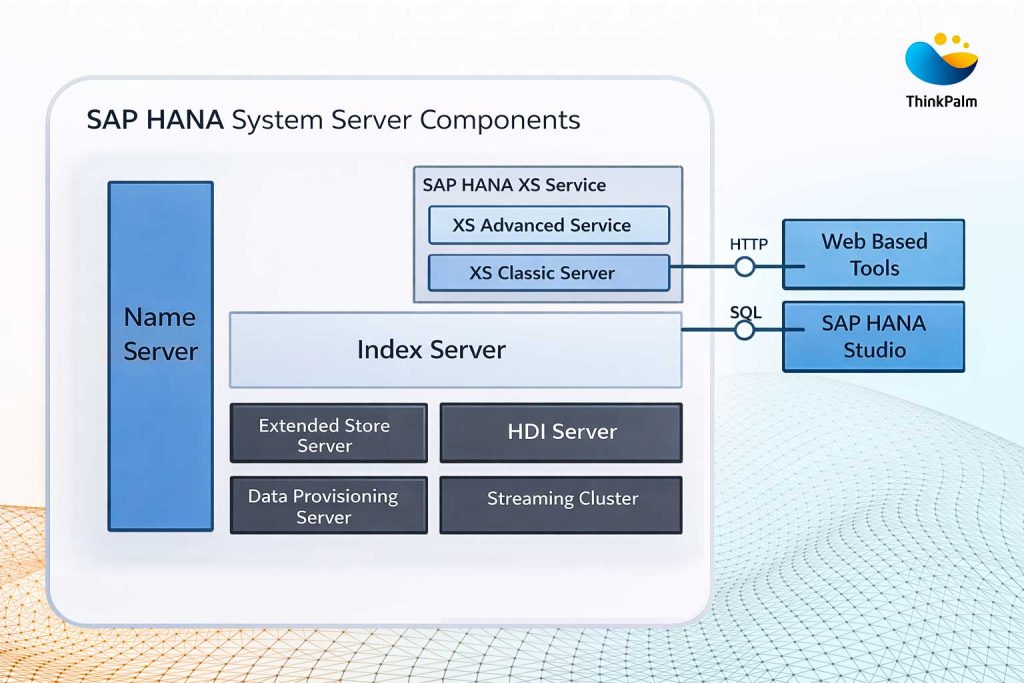
SAP HANA architecture diagram highlighting Index Server and System components
Following table lists all the key server components in HANA, the corresponding services and OS process details.
| Server Component Name | Service Name in HANA system | OS Process Name | Component Details |
| Index Server | Indexserver | hdbindexserver | Responsible for processing SQL statements using SQL/MDX Processors. |
| Name Server | nameserver | hdbnameserver | To maintain topology of SAP HANA system. This is used to manage all the running components and data stored on each component. |
| XS Classic Server | xsengine | hdbxsengine | It can be used to develop and host applications on the top of SAP HANA system. |
| Data Provisioning Server | dpserver | hdbdpserver | To provide SAP HANA smart data access function. |
| Preprocessor | preprocessor | hdbpreprocessor | To analyze the text data and perform search capabilities. |
| Compile Server | Compileserver | hdbcompileserver | This is used to perform compilation of SQL Procedures and doesnt contain any data. |
| Web Dispatcher | Webdispatcher | hdbwebdispacher | It is used to process HTTP/HTTPS request to HANA XS Engine. |
A special feature of SAP HANA is that multiple databases can be run inside one SAP HANA system. This is called Multitenant Database Containers (MDC).
Well, it can be compared to a building with separate “rooms”. Each room is private, but the whole building shares the same structure.
Each database still has its own:
So even though they share the same platform, each database stays isolated and secure, a big benefit for large enterprises.
There are several other servers in SAP HANA besides the index server, and it helps the system run smoothly:
In a multitenant (MDC) environment, some of these servers work at the system level, while others work inside each tenant database.
In large companies, SAP HANA often runs across many machines (called hosts).
If one machine stops working, SAP HANA automatically switches to a backup machine. This ensures:
Therefore, these are major SAP HANA advantages for businesses that need stable and always-on systems.
Explore best practices for deploying scalable storage systems that support real-time analytics.
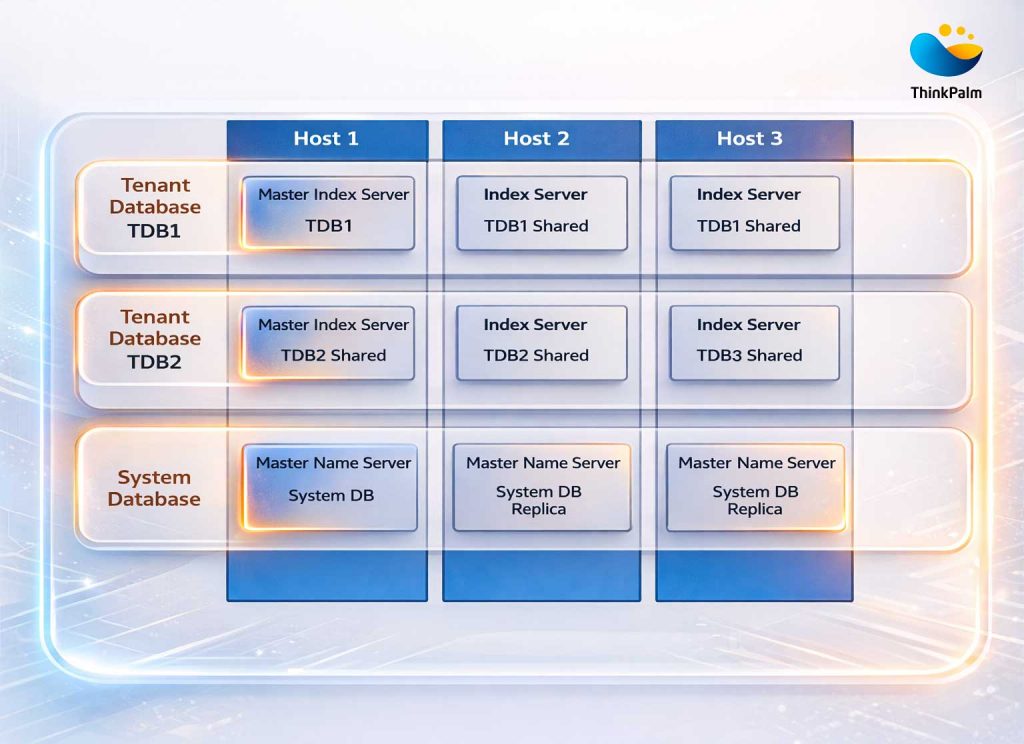
SAP HANA multi-tenant database container architecture across multiple hosts.
In the above diagram, you can see 2 databases distributed across three hosts in multiple container database systems.
In multiple container architecture, the system database is set up at the time of installation of a multiple-container system or when you convert a single container system to multiple container system. This is used to manage information about the system as a whole, and also for tenant databases. It is used for Central System Administration in a multitenant environment.
One of the biggest challenges of working with databases is dealing with the complex data stored in it. In earlier contexts, users needed to know SQL queries, schema structures, and technical details to extract meaningful insights. But with AI, they don’t have to.
AI tools like OpenAI’s GPT and LangChain make it easier for people in a company to work with data stored in SAP HANA or systems built on SAP S/4 Hana.
Therefore, by enabling natural language data access and AI-driven analytics, approaches such as Retrieval-Augmented Generation (RAG) help AI models fetch accurate, context-aware information from enterprise data sources.
Hence, users can ask questions in plain English for example, “Show me the top 10 products by revenue.” LangChain then automatically turns that simple question into the correct SAP HANA query, gets the data, and presents the answer clearly in a user-friendly format.
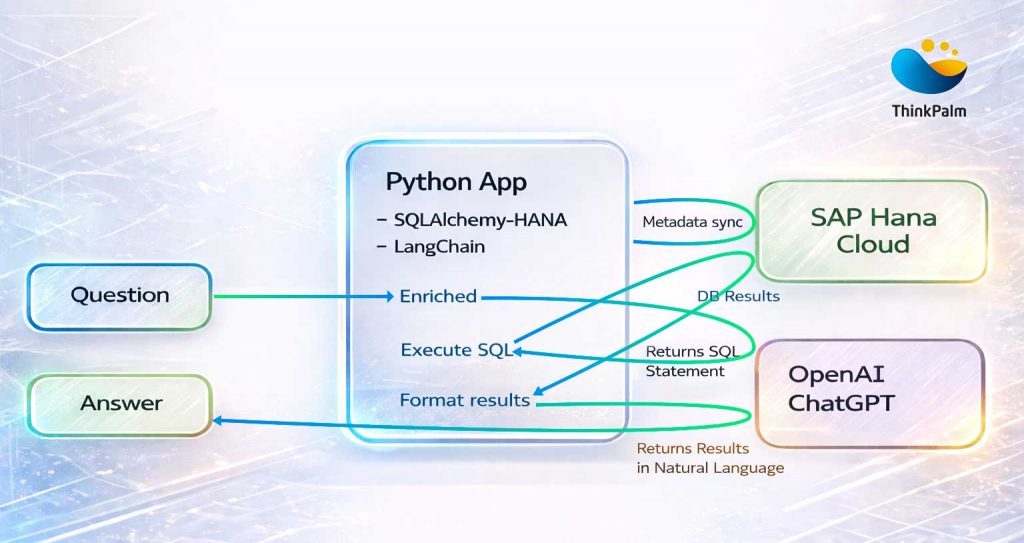
Python–SAP HANA Cloud integration using LangChain and OpenAI ChatGPT for natural language query processing
User Query (Natural Language) → Provided to an AI agent.
LangChain SQL Agent → Understands intent, converts it into HANA-compatible SQL query
SAP HANA Database → Executes the query in real-time.
AI Model → Interprets and summarizes the results, optionally adds charts or explanations.
User Output → The user receives a clear, natural-language response with insights.
The advantages of SAP HANA become clearer when we look at some real-world use cases. Many global brands rely on SAP HANA to manage data, simplify processes, and support real-time analytics. Here are some examples.
Learn more about how AI can augment enterprise workflows alongside systems like SAP HANA in ThinkPalm’s Agentic AI Solutions .
Apple is renowned for creating most of its own systems. However, it still works with SAP in areas like supply chains and enterprise apps. Also, they use HANA in some of its global business operations to bring data together across different regions, run real-time analytics, and support financial reporting across countries.
SAP HANA also helps Apple connect its business data with iOS apps using the SAP Cloud Platform SDK for iOS, making it easier for teams to access important information on their iPhones and iPads.
JPMorgan Chase, one of the world’s biggest banks, uses SAP HANA to process financial transactions quickly and safely. With SAP HANA’s real-time speed, the bank can monitor risks, detect possible fraud, and meet strict regulatory rules. HANA also helps JPMC run predictive models and simulations to understand portfolio risks better.
Coca-Cola uses the SAP HANA database to manage its supply chain and inventory more efficiently. With its fast data processing capability, the company can now predict product demand, improve stock levels, and respond quickly to market changes.
| Advantages of SAP HANA | Disadvantages of SAP HANA |
| Unmatched Speed Real-time performance with in-memory processing | High Cost Requires high-end hardware (large RAM), and licensing can be expensive. |
| Simplified IT Stack Combines transactional and analytical workloads in a single platform | Complex Deployment System architecture and tuning require expert knowledge. |
| High Compression and Performance Columnar storage compresses data up to 10x, increasing efficiency. | Vendor Lock-in Deep integration with SAP makes migrations to other platforms more complex. |
| Advanced Analytics Built-in tools for machine learning, predictive analytics and spatial analysis. | Not Ideal for Small Applications Overkill for lightweight or low-transaction systems. |
| Multi-Tenant Capabilities Supports MDC (Multi-Tenant Database Containers) for better isolation | Steep Learning curve Requires specialized skills for administration and development. |
Read how enterprises transform data management with automation and advanced testing.
While SAP HANA brings immense speed and real-time processing, its true value is realized when it powers enterprise applications. It forms the basis for SAP S/4 HANA, i.e. SAP’s next-generation business suite. As, it can handle huge volumes of data incorporating advanced features such as predictive analytics and machine learning capabilities, enabling digital transformation across sectors. With its real-time data processing and analytics, learning what is SAP S4 HANA would equip businesses towards performing high-end performance tasks with better scalability and cost effectiveness.
We have seen in our discussion that SAP HANA is not just a database. It is a powerful platform that enables innovation, real-time insights, and next-generation application development. Although its speed and capabilities support critical business workloads, SAP HANA also carries with it a certain level of complexity and cost. However, this may have to be managed carefully.
At ThinkPalm, we specialize in SAP HANA installation, ensuring smooth system setup and administration services that enable high availability, scalability, and security. We focus on efficient system configuration, backup and recovery, continuous monitoring, troubleshooting, and optimization. This helps maintain a reliable and secure SAP HANA environment.
SAP HANA is an in-memory database platform that allows enterprises to process large volumes of data in real time. It enables faster analytics, real-time transactions, and smarter decision-making across business operations.
Unlike traditional disk-based databases, SAP HANA stores data in memory and uses columnar storage. This significantly improves performance and allows both transactional and analytical workloads to run on the same system.
SAP HANA security is built on multi-layer encryption, including data encryption in transit, at rest, and in use. It also uses secure key management mechanisms such as SSFS and LSS to protect encryption keys and credentials.
SAP HANA architecture is designed with components like the Index Server, persistence layer, and multi-tenant database containers (MDC). Together, they ensure high performance, data integrity, scalability, and high availability even during system failures.

Ajeeth K Ajeeth Kumar is a software engineer specializing in SAP HANA database management, including installation, recovery, and automation testing. He works closely on regression testing, creating reliable test cases, and developing automation scripts to improve product quality. With hands-on experience in validating SAP HANA deployments, he ensures smooth compatibility across different environments. When he’s offline, you’ll find him catching up on the latest automotive blogs and vlogs.