AI in Software Testing: Enhancing Manual Testing with Human Insight
Artificial Intelligence
 Riya Mariya John
February 13, 2026
Riya Mariya John
February 13, 2026



 Riya Mariya John
February 13, 2026
Riya Mariya John
February 13, 2026
Software is moving fast today. New features are released often, and QA teams are expected to keep up. Manual testers who once had plenty of time now work under tight deadlines.
Imagine finding a bug just before a release. Do you rush testing or delay delivery? Many testers face this choice every day. This is where AI in software testing can be of great help.
In brief
AI does not replace testers. It acts like a helpful assistant that handles repetitive work, spots patterns, and highlights risky areas. With artificial intelligence in software testing, testers can focus more on thinking, exploring, and understanding how real users interact with the product.
Still, technology alone is not enough. AI in QA can analyse data, but it cannot judge how an app feels to use. Human testers bring creativity, empathy, and real-world thinking. When AI and manual testers work together, testing becomes faster, smarter, and more meaningful. Read on as we explore how AI supports manual testing and helps testers deliver better quality without losing the human touch.
In simple terms, AI in software testing means using smart systems that can learn from data to support testing activities. What makes it the best is that it does not just follow fixed rules alone. AI can study past test results, user behavior, and defects to make better testing decisions over time.
Artificial intelligence and software testing work together by helping testers handle tasks that are repetitive, time-consuming, or data heavy. For example, AI can review large requirement documents and suggest test cases, analyse past bugs to find risky areas, or watch how users interact with an application to highlight features that need more testing.
You can think of AI as a smart assistant sitting next to a tester. It can say, “This feature caused problems before,” or “Users click this button most often.” The tester still decides what to test and how deeply to test it. AI only provides guidance and insights.
This is why software testing and artificial intelligence are not about replacing human testers but about working together to deliver better quality.
AI is good at speed, pattern recognition, and analysis. Humans are good at curiosity, creativity, and understanding of users. When combined, they make testing more efficient while keeping quality and user experience at the center.
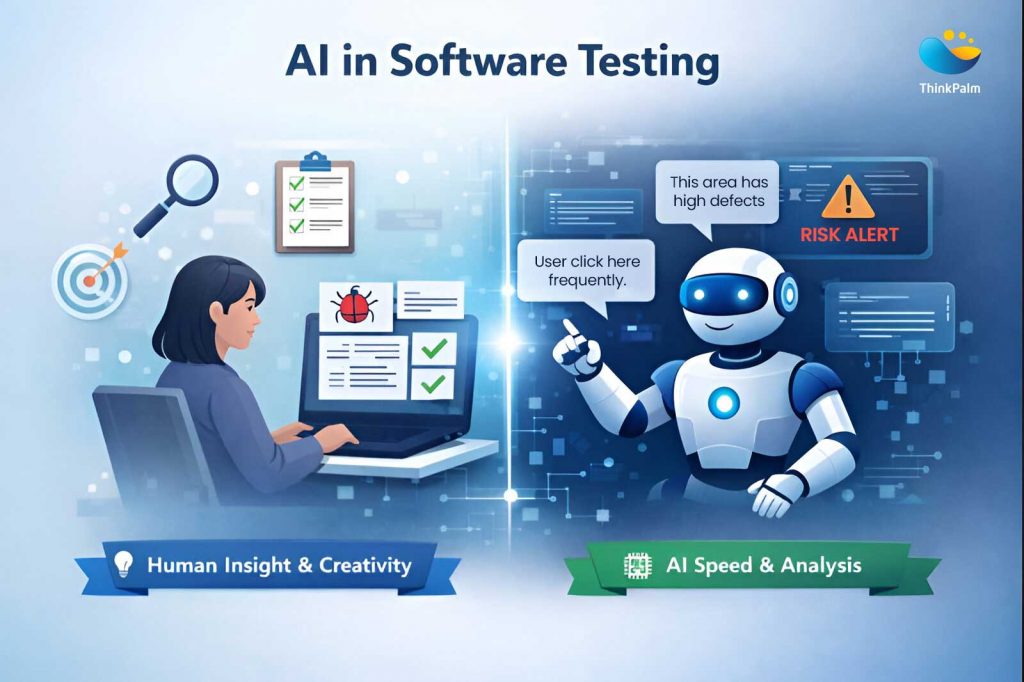
Smarter testing happens when human creativity works alongside AI-driven speed and analysis.
As AI in QA testing becomes more common, many testers wonder, “Will my job disappear?” The answer is no. Manual testing is still very important because there are things only humans can do well. AI can assist, but it cannot replace human intuition, creativity, and empathy.
Using AI in manual testing does not make humans obsolete. Instead, it takes care of repetitive work, like running the same tests over and over, so testers can focus on high-value tasks that require human intelligence.
So, as an answer to the common doubt, AI in QA testing complements manual testing and does not replace it. It helps testers work smarter and deliver better quality software.
AI isn’t here to change what testing is about. It simply makes the job easier, faster, and less stressful. Instead of spending hours on repetitive checks, testers can focus on finding real issues that impact users. That’s why more teams are turning to AI in QA to support their testing efforts.
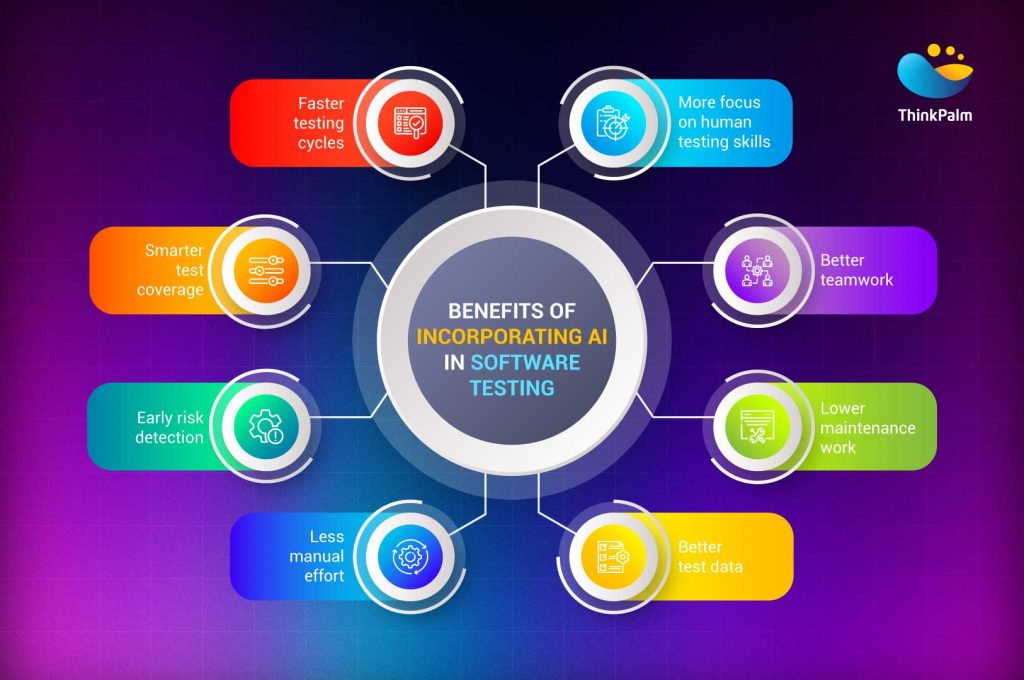
So, what are the real advantages of AI in software testing? Let’s break it down
The biggest advantage of AI in software testing is balance. AI brings speed and intelligence, while testers bring judgment and creativity. Together, they create a testing process that’s faster, smarter, and more reliable.
AI could be a clever teammate that handles the heavy lifting for you. It could help spot patterns you might miss and give you more time to focus on the important stuff.
Here’s how the AI role in refining software testing process comes to life:
In short, AI sharpens the testing process while testers bring the judgment, creativity, and real-world understanding that machines simply don’t have.
Using AI in software testing is less about handing over control and more about working side by side. AI is more like a copilot that supports your decisions, speeds up routine work, and points you in the right direction, while you stay firmly in the driver’s seat.
From designing better test cases to prioritizing risks and simplifying automation, AI-driven testing fits into different stages of the QA workflow. Here’s how teams are practically using AI as a copilot in modern software testing.
Designing test cases by hand can be slow and tiring. After a while, it’s easy to miss rare edge cases, unusual user paths, or hidden dependencies. Even experienced testers can overlook things when deadlines are tight, which can leave gaps in test coverage.
This is where AI-driven testing steps in to help. Looking at everything from requirements and user stories to production logs, generative AI in software testing helps create smarter and more complete test suites. That said, AI doesn’t work alone. Human testers are still needed to review its suggestions, add context, and make sure the tests actually reflect real user needs and business priorities.
| AI’s Role in Smarter Test Case Design | Tester’s Role in Smarter Test Case Design |
| Scans requirements and user stories to suggest baseline scenarios using NLP | Reviews and filters AI-generated scenarios to remove duplicates or low-value tests |
| Analyzes past defects and production incidents to identify weak areas | Applies domain knowledge to validate risk areas and add missing context |
| Uses user behavior data to prioritize frequently used workflows | Designs exploratory tests using intuition and real-user thinking |
| Proposes edge cases beyond typical happy-path scenarios | Ensures test cases align with business goals and customer priorities |
| Works with large datasets to improve coverage and consistency | Acts as the final decision-maker and approves the test suite |
In software testing, not every feature carries the same level of risk. Some failures can quietly go unnoticed, while others can bring critical user journeys or business operations to a halt. When time and resources are limited, testers need to know exactly where to focus.
This is where AI in QA becomes a powerful ally. Instead of spreading effort evenly, testers can focus on areas where issues are most likely to occur or where the impact would be highest.
So, how does AI predict potential issues in software testing? Let’s check it out!
| AI’s Role in Risk-Based Prioritization | Tester’s Role in Risk-Based Prioritization |
| Analyzes historical defect data to identify recurring problem areas | Uses domain knowledge to validate whether the risk ranking makes real-world sense |
| Processes usage analytics to prioritize features used most by customers | Adjusts priorities based on business impact, compliance, and stakeholder needs |
| Combines system logs, code complexity, and past test results to predict failure likelihood | Decides where exploratory testing will deliver the most value |
| Highlights high-risk modules early in the release cycle | Balances AI insights with release timelines and testing capacity |
| Continuously updates risk scores as new data becomes available | Makes the final call on what gets tested first |
Repetitive testing tasks can quickly drain a tester’s time and energy. Running the same regression tests leaves little room for meaningful exploration. This is where AI-based test automation makes a real difference.
With AI in software test automation, routine work is handled faster and more reliably. Software testing using AI allows testers to shift their focus from repetitive execution to thoughtful analysis, exploration, and quality improvement.
| AI’s Role in Automating Repetitive Tasks | Tester’s Role in Automating Repetitive Tasks |
| Automatically runs regression tests across browsers, devices, and environments | Oversees automation to ensure test runs are reliable and relevant |
| Optimizes test execution by skipping redundant or low-value tests | Reviews failures to distinguish real bugs from automation issues |
| Generates large volumes of realistic, privacy-safe synthetic test data | Validates that test data reflects real-world user scenarios |
| Logs test results in real time and categorizes failures | Interprets results and decides next testing actions |
| Produces dashboards and reports for teams and stakeholders | Communicates insights and risks to product and business teams |
Test execution produces a huge amount of data, and manually making sense of it can be quite difficult. Logs, reports, metrics, and dashboards often pile up faster than teams can review them. This is where AI for software testing truly shines.
AI for testing turns raw data into clear, real-time insights. Instead of reacting after problems appear, testers can spot risks early and make informed decisions throughout the testing cycle.
| AI’s Role in Real-Time Insights and Analytics | Tester’s Role in Real-Time Insights and Analytics |
| Groups related defects to uncover systemic issues and root causes | Reviews clustered defects to understand real impact and urgency |
| Automatically calculates metrics like test coverage, defect density, and cycle time | Interprets metrics in context to separate noise from real risk |
| Continuously updates dashboards with real-time testing data | Uses insights to guide regression planning and testing focus |
| Visualizes risk areas using heatmaps and trend analysis | Explains risks and quality status to stakeholders |
| Detects patterns that may indicate future failures | Adds qualitative judgment based on user experience and business impact |
Traditional test automation often requires strong coding skills, which can slow teams down or limit who can contribute. Conversational automation changes that. With the help of AI agents in software testing, testers can describe scenarios in plain language and let AI handle the technical work.
This is where agentic AI in software testing really stands out. AI testing tools act like intelligent assistants that understand intent, generate scripts, and keep them updated as applications evolve.
| AI’s Role in Conversational Automation | Tester’s Role in Conversational Automation |
| Converts plain language test steps into executable scripts | Writes clear, business-focused test scenarios |
| Generates scripts in tools like Selenium, Appium, or Cypress | Reviews generated scripts for logic and accuracy |
| Identifies reusable steps and creates shared components | Ensures reuse aligns with real workflows and standards |
| Uses self-healing to update scripts when the UI changes | Validates that updates still meet functional requirements |
| Reduces script maintenance effort over time | Collaborates with product and business teams to refine scenarios |
Bringing AI into manual testing doesn’t have to be complicated or overwhelming. You don’t need to change everything overnight. The best results come from introducing AI gradually, while keeping human judgment at the center of the process.
Here’s a simple, step-by-step workflow to help you get started.
Start by looking at where your testing process struggles the most.
Are regression cycles taking too long? Are bugs slipping into production? Is test coverage inconsistent?
Knowing these pain points helps you decide where AI can add real value instead of creating extra noise.
Not every AI tool will fit your team. Look for tools that support your existing workflows rather than replace them.
Popular options like Testim, Applitools, and Mabl focus on visual testing, smart automation, and self-healing scripts. Choose tools that solve your specific problems.
Avoid rolling out AI across all projects at once. Begin with a small pilot, such as using AI for test case generation or defect prediction in one module.
This helps your team build confidence and understand what works before scaling further.
AI-driven testing works best when testers know how to guide it. Invest time in training through workshops, demos, or hands-on practice.
Help testers learn how to review AI output, ask better questions, and use insights effectively.
Be clear about responsibilities.
Let AI handle repetitive work like automation and analytics, while testers focus on exploration, user experience, and ethical decision-making.
This balance keeps manual testing strong and meaningful.
Track the impact of AI using simple metrics such as time saved, improved test coverage, or reduced defect leakage.
Use these insights to refine your approach and continuously improve how AI supports your testing process.
To conclude, AI in software testing isn’t about replacing manual testers. It’s about changing how they work and giving them better support along the way. When AI takes care of repetitive tasks and heavy data analysis, testers get the freedom to focus on what really matters: understanding users, exploring edge cases, and thinking critically about quality.
The future of testing isn’t a choice between humans and machines. It’s about building a partnership where AI does heavy lifting, and testers lead with insight and experience.
That’s exactly how ThinkPalm approaches AI-driven software testing. By combining strong AI capabilities with deep manual testing expertise, ThinkPalm helps teams adopt AI in a practical, human-first way that improves quality without losing control.
Because the best testing results don’t come from AI alone or humans alone. They come from working better together.
AI in software testing uses artificial intelligence to support test design, execution, and analysis, helping testers work faster and smarter without replacing human judgment.
AI can be used to generate test cases, automate repetitive tests, analyze results, and prioritize high-risk areas across the testing lifecycle.
AI analyzes past defects, system data, and usage patterns to identify risk areas that are more likely to fail in future releases.
AI speeds up testing, improves coverage, reduces manual effort, and allows testers to focus on high-value, human-centered testing tasks.
Riya Mariya John is a Senior Test Lead with extensive experience in manual testing and a strong background in software quality assurance. She has worked across test planning, test case design, defect management, regression testing, UAT coordination, and release validation. She is committed to improving QA processes, mentoring junior testers, and fostering a strong culture of quality across the software lifecycle.